


Sorry, there were no results found for “”
Sorry, there were no results found for “”
Sorry, there were no results found for “”
As knowledge workers, we spend days and weeks reading and digesting information that helps us get better at our jobs. Between the ever-growing stack of industry reports, customer research, and the usual work emails and process documents, something new always demands our cognitive attention.
The worst part? The to-be-read list never seems to reduce. Despite dedicating so much time to it daily, I still feel like I need to catch up.
In this blog post, I’ll talk about some top AI summary generators that my team and I recently tested. These will help you and me catch up on our reading faster than before and finally close those two hundred thirty-seven open tabs.
Here we go!
When compiling this list, I tested over a dozen AI summarizing tools. Many of them employed OpenAI’s GPT engine to provide concise summaries. However, I also found a few built on proprietary Large Language Models (LLMs). While the latter came with more customization options, they also had heavier price tags attached.
Here’s what I looked for when testing these apps:
For AI summarizers that support multiple languages, I also put some of those capabilities to the test—focusing on their accuracy in French and Spanish (apart from English).
| Tool | Key features | Best for | Pricing* |
|---|---|---|---|
| ClickUp | • Summarize meetings, chats, docs, and tasks in real time • Translate summaries in different languages • Generate summaries on mobile and as custom fields • Auto-generate action items from summaries | Mid-sized to enterprise teams managing work, documentation, and updates | Free plan available; Custom pricing for enterprises |
| Get Digest | • Choose summary length by % • Summarize from URLs, PDFs, or pasted text • Supports 33+ languages • Extract keywords | Individuals or small teams needing quick, language-flexible text summaries | Free plan available; Paid plans start at $133/user/month |
| Scribbr | • No sign-up needed • Re-summarize for different lengths • Plagiarism check • Summary download as .txt | Students and academic researchers in need of simple, citation-aware summaries | Free |
| Summary Generator | • One-click summaries • Simple, list-based output • Minimalist interface | Individuals, especially students or non-tech-savvy users | Free |
| Notta | • Chapter-wise summaries for transcripts • Meeting template support • Shareable links | Mid-sized teams summarizing meetings, webinars, or podcasts | Free plan available; Paid plans start at $14.99/user/month; Custom pricing for enterprises |
| Paraphraser.io | • Summarize up to 15,000 words • Multilingual support • Grammar and plagiarism check • Paraphrase option | Individuals handling long-form, academic, or multilingual documents | Free plan available; Paid plans start at $7/user/month; Custom pricing for enterprises |
| Jasper | • Audience-specific summaries • Chrome extension • Brand voice customization • 25+ languages | Enterprise marketing and content teams needing custom, on-brand summaries | 7-day free trial; Paid plans start at $49/seat/month; Custom pricing for enterprises |
| Writesonic | • Article-to-social summary generation • Summarize and rewrite multiple blogs • 25+ language support | Marketers and content creators in small to mid-sized teams | Free trial available; Paid plans start at $99/month |
| Gimme Summary AI | • Chrome extension • One-click web article summaries • No sign-up or ads | Individuals needing lightweight article summaries while browsing | Free |
| Copy.ai | • Bulk summary workflows • Templates for summary prompts • SEO-optimized meta generation | Content and research teams summarizing in bulk (small to large teams) | Free plan available; Paid plans start at $49/user/month; Custom pricing for enterprises |
Our editorial team follows a transparent, research-backed, and vendor-neutral process, so you can trust that our recommendations are based on real product value.
Here’s a detailed rundown of how we review software at ClickUp.
In this section, we’ll explore individual summarizers, showcasing their strengths and weaknesses so you can make an informed choice.
ClickUp is an all-in-one work management platform that helps you with document collaboration, project management, and internal communications from a single app.
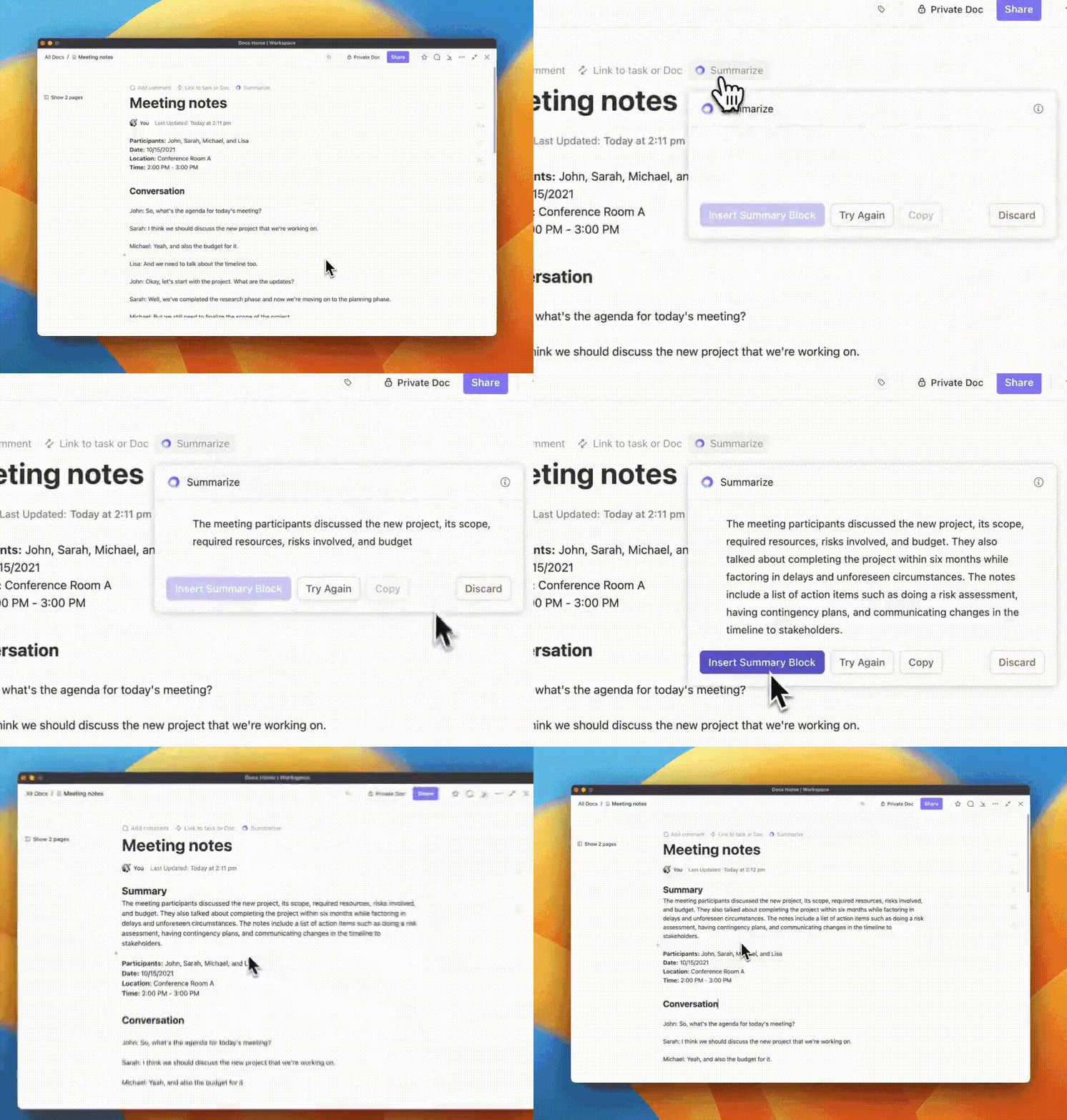
And the best part? All of these tools are tightly integrated with ClickUp Brain. This is the planet’s most powerful, context-aware AI assistant. It can help you do everything from finding information and writing content to summarizing project updates and translating documents.
All you have to do is add your content to ClickUp Docs (the built-in document collaboration software) and ask AI to summarize text. You can also give prompts about the summary’s tone, readability level, and audience to make it more contextual.
💡 Pro Tip: Want to summarize meeting notes as well? Try ClickUp’s AI Notetaker. Give it permission to automatically join your meetings and watch as it records, transcribes, and analyzes your discussion for you. After every call, get a meeting overview, speaker-labelled transcript, and action items neatly documented—straight in your ClickUp Inbox.

Another way to use ClickUp Brain is to ask it to find some information and then create a document or task list out of it. For example, I could ask ClickUp to tell me about the onboarding process at my company and then make an onboarding task list within ClickUp for a new hire to refer to.


ClickUp Projects also provides a ‘summarize’ button for all ClickUp Tasks and comment threads. All I’ve to do is ask AI to summarize all project updates. It helps me stay up to date without digging into 50-odd messages manually.
In addition, you can use the Ask AI feature in ClickUp to receive work updates and track your team’s weekly (or daily) progress.

This is a convenient feature, especially for managers.

All you have to do is add the teammates whose work updates you need, choose the interval —weekly, daily, or custom—and decide the format in which you want it presented. You can get all their updates or ask ClickUp Brain to give you a summary or bulleted list. The last one can be beneficial if you have a lot of work updates to go through.
Want to track multiple projects at the same time? You can use ClickUp’s Custom Fields option to add AI summaries and AI project updates as two columns in your tasks—and get automatic summaries without opening your assignments or projects each time.

Communicating with a global team or non-English-speaking customers can be tricky at times. I overcame this by adding my documents in English and asking ClickUp Brain to summarize them in a different language, which I can share with my non-English-speaking customers.

💡 Pro Tip: Brain MAX is ClickUp’s AI super‑app that offers unified search, automation, and voice-to-text across your entire workflow, including tasks, Docs, meetings, connected tools, and the web. It lets you pick the optimal model (ChatGPT, Claude, Gemini, etc.) for tasks like summarizing, writing, or reasoning. You can ask Brain MAX to summarize Docs, task threads, or comments, and inbox notification threads, all drawn from your actual work context!

The next tool I tested was Get Digest, a straightforward AI summarizer with a user-friendly interface and powerful document summarization.
What stands out about this tool is that you can pick among various summary modes and determine the summary length. The ‘% of Source’ section has six options to pick from—5, 15, 25, 35, 45, and 55. The greater the number you pick, the lengthier the summary.
I’d recommend this summarizing tool if you know how much information you need from a piece of writing. For example, if you just want the most important information from an article, you can pick ‘5%’. If you want the gist of the whole article, almost half the length of the article, go for ‘55’ instead.
But its capability to summarize articles is limited—it gives you a bunch of keywords and a gist of the key points. You can’t get the document summary in a single paragraph or ask for specific highlights.

Scribbr provides AI writing tools for scholars and researchers, with features such as academic writing and editing, APA-style editing, citations, and, of course, summarizations.
The best part is that you don’t have to sign up to use this summarizer tool. You can even check if the summary generated is plagiarism-free. And this, too, is done free of cost. So, if you’re a student looking for economical summarizing tools, this is a good option.
I have featured Summary Generator—a basic document summarizer with minimal UI (just three buttons)—for students or non-tech-savvy people who might be intimidated by the more advanced tools on this list.
Here’s how it works—you add a block of text, and it gives you a simpler, easily digestible version of it, with lists included. You can hit the ‘Copy’ button and paste this text on a word processor or notepad.
Since the tool has minimal features, you can’t download the summary as a text file or ask for specific highlights.
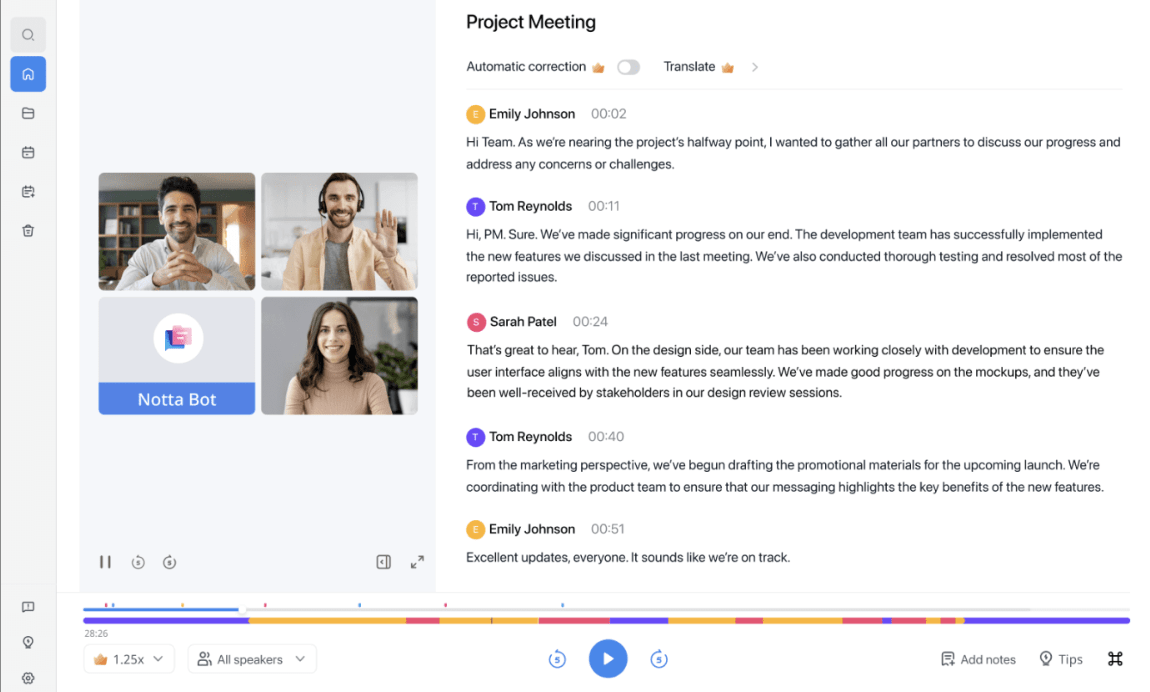
As Notta is primarily a note-taking app, it’s quite good at analyzing the nuances in dialogue. This makes it the perfect tool to summarize webinar and podcast transcripts.
I liked how Notta creates chapters for each transcript summary—it feels like you’re reading a blog post or a book, not just a bunch of bullet points.
You can also use Notta in your meeting recap documents to extract actionable insights.

Want to summarize large documents? Paraphraser.io is a great option. I tried summarizing a 15,000-word scientific paper, and the results were great.
It also shows details such as the number of words, characters, sentences, and paragraphs of the original text. This helps compare the summary with the original. However, you can’t create custom summaries based on things like tone or keywords.
While Paraphraser.io also allows you to generate summaries as bullet points, I found them disjointed and missing the original context in some instances. I also tested its French summarization capabilities, and the results were on point.

Jasper is well-known for being an AI content generator built for enterprise teams. But one of its features also includes the AI text summarizer.
I uploaded my text to Jasper and generated summaries using one of three default summary prompts and my own prompt. While the default prompts work well, you’ll get better results by adding more context to your custom prompts.
One feature I’m impressed with is the ‘Audience’ option, which generates the summary for different audience types. For example, I got a pretty easy-to-understand summary of an NFT-related article.
Jasper offers a 7-day free trial (a credit card is required) so you can explore its features before purchasing.

While Writesonic uses OpenAI’s LLM for summarization, it has been trained specifically on marketing content. This makes it a great summary generator for marketers. For example, you can ask it to generate a hook for social media posts based on a long-form article. And you can regenerate the summary for variation.
A particularly good feature is the Article Writer 6. All I had to do was give a topic (interactive demos) and choose some references. Writesonic created a draft with inputs from all those references in just a few minutes. It also cites references, so you can go back to those articles for deeper research.
Quite the timesaver for writers in the research and outline phase!
Check out these Writesonic alternatives!

How often have you bookmarked an article to read later because you were on a time crunch? With Gimme Summary AI’s Chrome or Brave browser extensions, I can get an overview of the main talking points of any web article within a few seconds.
The best part? I don’t have to copy and paste articles into different tabs to get the summary.
However, as Gimme Summary AI is built over ChatGPT, I’m asked to go to the ChatGPT window for authentication when I ask to generate a summary, which can be inconvenient.

Sometimes, even summarizing content can become a huge time-killer—especially if you’re a marketer who has to summarize blogs into bullet points for social media or a research student who has to read a hundred different research articles for a paper you’re writing.
If so, Copy.ai is the perfect choice. Its document workflow automation features empower you to streamline the summarization process.
I used it to draft a thought leadership blog post. I simply created a summary prompt outlining my specific requirements. Copy.ai then condensed my SME interviews, compiling the key points from each conversation into a single, concise summary.
If you’re looking for an AI summary generator for work—to summarize documents, chat threads, meeting transcripts, and such—then my top suggestion is ClickUp. Need the key points of a meeting in bullet points for a quick scan? Or maybe you want to highlight messages from an individual in a chat thread? It’s all possible with ClickUp Brain.
I agree that generating summaries can save you a great deal of time. But why stop there? Why not invest in a platform that does so much more to simplify your work and save you time?
That’s why I recommend ClickUp. In addition to summarizing text, it can also help you manage projects, collaborate with your team, and organize your tasks.
Sign up for ClickUp today and get hands-on experience with ClickUp’s AI summarizing capabilities.
© 2025 ClickUp




