
Sorry, there were no results found for “”
Sorry, there were no results found for “”
Sorry, there were no results found for “”
‘Work smarter, not harder’ is more than just a cliché—it’s a survival strategy for today’s professionals. 👨💼
Whether you’re leading a team, running your own business, or managing remote projects, maximizing productivity is crucial to staying competitive. That’s where AI productivity tools come in. 🦾
These tools automate repetitive tasks and streamline workflows to help eliminate bottlenecks and optimize daily operations. Since they handle the mundane aspects of your work, you can focus on the bigger picture—driving growth and innovation in your business.
In this blog, I’ll share the AI tools I rely on for efficiency and results. They helped me transform the way I work.
When I first began integrating artificial intelligence into my daily workflow, I was skeptical about its impact on my productivity. However, I quickly discovered that leveraging AI tools can significantly help me manage tasks and make decisions.
Here are some benefits I’ve experienced:
🔍 Did You Know? According to a Forbes Advisor survey, over 60% of business owners believe AI will boost productivity.
When searching for an AI productivity tool, it’s essential to consider a few key factors that can make a significant difference in your workflow. Here’s what I look for:
With these elements in mind, you’ll be well-equipped to choose the best productivity tools to enhance your workflow.
We all know the struggle of juggling tasks, deadlines, and that never-ending to-do list. It can feel like a chaotic circus sometimes!
But what if I told you that these project management tools can make your work life a whole lot smoother and help you learn how to be more productive with their AI capabilities?
First up is ClickUp—an all-in-one productivity powerhouse designed to tackle it all. When I say this app really does it all, I mean it can do everything from organizing complex projects and tracking deadlines to managing personal tasks and facilitating team collaboration.
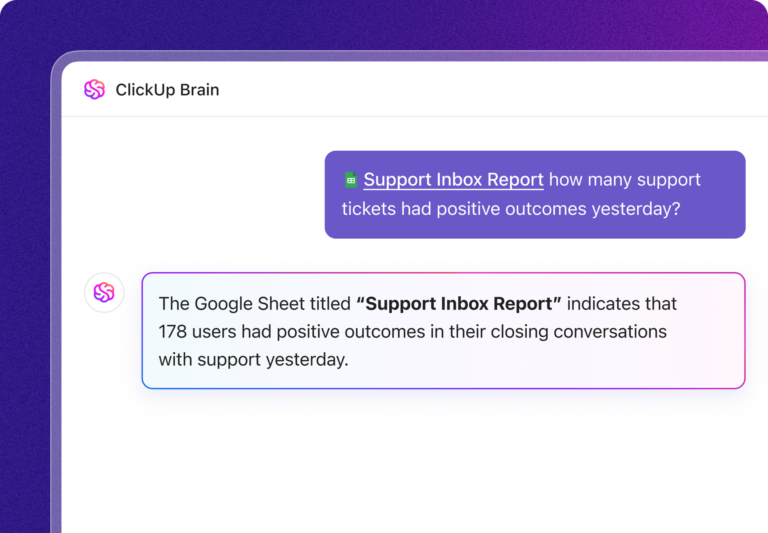
But what really made me pick this highly-rated project management tool is ClickUp Brain with its AI-powered capabilities.
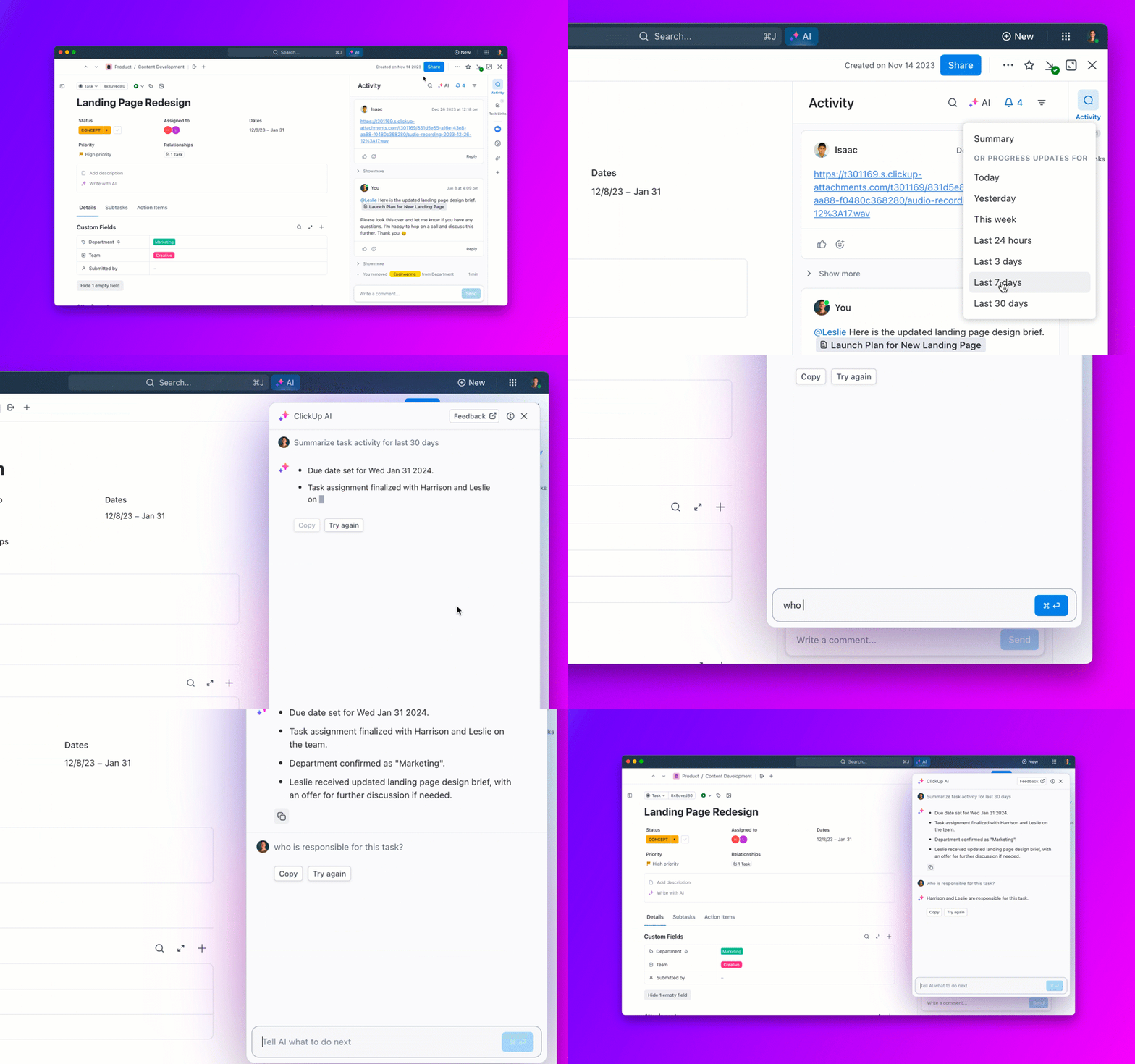
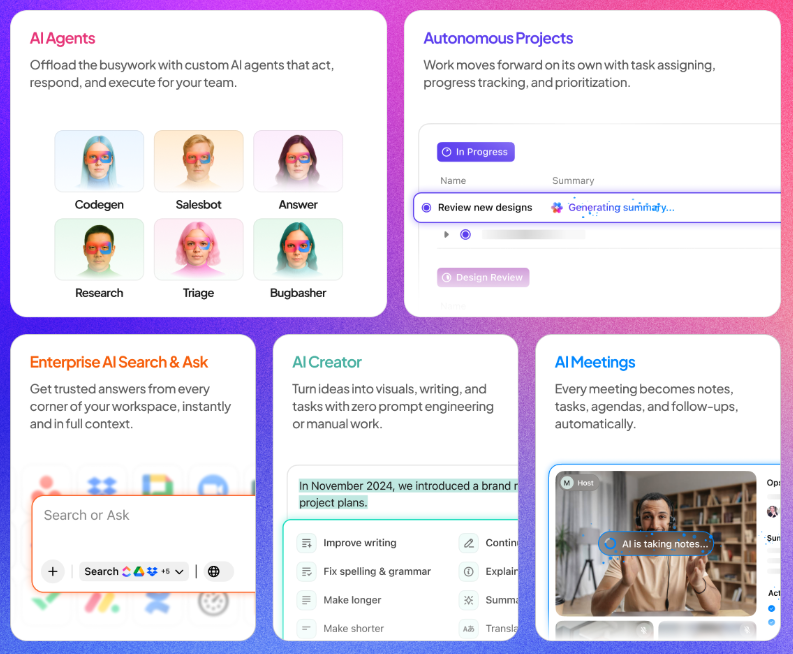
ClickUp enhances productivity with its top ClickUp Brain features—the AI Knowledge Manager, AI Project Manager, and AI Writer. These tools help you complete tasks and anticipate your needs, suggesting task breakdowns, priorities, and deadlines as you plan your projects.
It even offers AI meeting summarization, so you can quickly capture key points and action items from your meetings without sifting through lengthy notes.
This proactive support eliminates guesswork and keeps everything on track.
Here’s how Pressed Juice tripled their productivity without having to scale their team.
Pressed Juice Makes Good Nutrition Accessible to All through ClickUp
Now, who doesn’t love a little extra help with writing and creative projects?
That’s where the writing assistant comes in. It offers built-in spell check, AI quick replies for effortless messaging, and the ability to create organized tables with insights. You can instantly generate briefs, blogs, reports, and project outlines, ensuring your writing is polished and tailored to your specific needs. Plus, ClickUp AI can summarize lengthy documents and meeting notes, helping you focus on critical tasks without getting bogged down in details.
📌 Example: If you’re a content marketer, you could use ClickUp Brain to draft engaging blog posts or generate social media captions that resonate with your audience.

ClickUp Brain MAX: Advanced AI for your desktop and beyond
For even more powerful AI productivity, ClickUp offers Brain MAX—a standalone desktop app that takes everything great about ClickUp Brain and expands it across your entire computer. With Brain MAX, you can search across ClickUp, your connected work apps (like Google Drive, Figma, and GitHub), and the web, all in one place.
Use Talk to Text to dictate notes or tasks hands-free, and create or update tasks and docs directly from your desktop.
A standout feature of Brain MAX is the ability to choose between leading AI models—including ChatGPT, Claude, and Gemini—for chat and research, giving you flexibility to leverage the best AI for your needs.
Know more about Brain MAX in this video.
I love combining ClickUp Brain with ClickUp Automations. This powerful duo simplifies tedious manual processes, making auto-scheduling and task ranking a breeze for anyone juggling multiple priorities. ClickUp AI anticipates upcoming tasks and optimizes your workflow by automatically scheduling tasks based on deadlines and importance.
📌 Example: A marketing manager can automate a campaign by setting a rule: When a task is marked ‘Completed,’ notify the design team to start on promotional materials and assign a one-week deadline. Meanwhile, ClickUp AI ranks the next tasks in line, so the team knows exactly where to focus their efforts to boost efficiency.

But it doesn’t stop there.
ClickUp Chat brings even more productivity enhancements to the table with its AI Catch Me Up feature, which keeps team members informed by summarizing conversations they might have missed. It also allows you to convert chat messages into actionable tasks, eliminating the need for context switching and ensuring important discussions are seamlessly integrated into your workflow.

While ClickUp Brain enhances productivity through AI-driven insights, ClickUp’s productivity templates provide a pre-built customizable framework to manage projects and tasks efficiently.
Staying organized can be tough, especially with all the tasks you juggle, but the ClickUp Personal Productivity Template helps you tackle it head-on. It is perfect for anyone looking to achieve personal goals by enhancing daily efficiency.
Your agency is missing out on so much productivity if you are not using ClickUp! Without Clickup, I would have to hire 3 more people to get the same things done.
Employee productivity is a key metric for measuring how well your team is performing at work. If you want to keep track of your team’s output, the ClickUp Personal Productivity Report Template is here to help.
Next, the Using ClickUp for Productivity Template tackles a variety of productivity challenges, making it perfect for all sorts of industries, project types, and job roles. It allows you to track and manage your workloads, tasks, to-do lists, and a mix of your goals all in one place.
🧠 Fun Fact: The first job AI ever had was playing chess. In 1956, the first AI program was written to play chess—though it wasn’t particularly good, it laid the foundation for AI’s future in gaming.

Wouldn’t it be great to have a productivity tool that handles more than just notes and project management? That’s exactly what Notion AI does. Building on Notion’s robust workspace, Notion AI takes it up a notch, acting like a personal assistant embedded directly into your workflow.
From automating repetitive tasks to pulling insights from your documents and beyond, this AI tool is crafted to save time and bring a fresh level of efficiency to your day-to-day life.
I like that it creates and refines documents seamlessly, using AI to match your unique tone and follow any style guide. Also, with features like SAML-based SSO, SCIM user provisioning, and advanced permissions, Notion AI keeps your workspace safe, compliant, and accessible.
Most AI tool roundups stop at features. This playbook takes the next step—10 practical ways small business teams can actually use AI across their everyday workflow.

What if an AI tool could manage your calendar, block time for focus, and even help you avoid back-to-back meeting burnout? That’s Reclaim AI.
This isn’t just another calendar app—it’s a smart scheduling solution designed to keep your workday balanced and productive. Reclaim AI has you covered with real-time adjustments, whether coordinating across time zones, protecting deep work sessions, or fine-tuning your daily plan.
And it goes beyond the basics—adapting to your role and priorities. From blocking ‘no-meeting’ days to dynamically adjusting personal blocks like workouts, Reclaim AI puts you back in control of your day.
When it comes to online interactions, chatbots are the unsung heroes, making conversations smoother and more efficient. These AI tools are designed to handle everything from simple inquiries to complex customer support, all while keeping users engaged.

ChatGPT is an AI-driven productivity tool by OpenAI that’s become a go-to for anyone looking to streamline tasks and boost creativity. It’s like having a limitless collection of personal productivity hacks at your fingertips.
Whether it’s writing emails, drafting reports, generating code, or even just brainstorming ideas, ChatGPT adapts to your needs with remarkable flexibility and a user-friendly interface.
Available in both a free version and an upgraded option, the tool is like your virtual assistant, ready to help 24/7 with enhanced response times and access to the latest models for even more advanced support.
🔍 Did You Know? ChatGPT gained 1 million users just 5 days after its launch in November 2022.

Need credible research for a presentation?
Just type in your topic, and Gemini (formerly known as Bard) pulls detailed answers, complete with direct quotes and source links, so you can dive deeper or easily verify the data.
Unlike typical conversational AIs, Gemini is connected to the web, giving you fresh, verified responses. Whether you’re researching for a work presentation or looking for quick insights, Gemini is ready to back up its answers with real sources, even linking directly to pages for easy fact-checking and deeper exploration.

Microsoft Copilot not only remembers the flow of your conversation but actually understands the context, letting you pick up right where you left off.
Whether you’re summarizing a long document, converting text into a slide deck, or simply trying to find a straightforward answer to a complex question, Copilot demonstrates how to use AI tools for productivity by handling the heavy lifting with ease.
It can instantly pull relevant, current data from the web, ensuring that your information is fresh and accurate. Plus, you can easily summarize books, web pages, or documents, making large amounts of text more digestible.
💡 Pro Tip: AI tools can sometimes produce biased or outdated information. Be sure to cross-check facts, especially for topics like current events or technical details. Over time, providing feedback to improve outputs can help refine the AI’s performance.
When it comes to content creation, AI tools are like having a creative partner at your fingertips.
Instead of getting stuck in the dreaded writer’s block, you can easily tap into these AI writing tools to brainstorm topics, generate outlines, and even refine your drafts.

Jasper is a generative AI platform crafted with marketing teams in mind to help deliver high-quality, on-brand content at scale. You can configure this tool to create content that matches your brand’s voice, tone, and style consistently across all platforms.
It also empowers marketers to streamline content creation and implement a productivity plan, taking your campaigns to the next level with an intuitive toolkit.
Plus, it lets you automate your marketing processes, integrating AI-powered workflows directly into your martech stack for seamless productivity.
💡 Pro Tip: To get the best results, be specific with your AI prompts. The more detailed and clear you are, the more likely you’ll get accurate and useful outputs. For example, if you’re using AI for content creation, specifying tone, style, or word count can lead to better and more relevant responses.

Forget fragmented AI tools—Copy.ai’s platform delivers a unified, secure solution for all your go-to-market (GTM) needs. This GTM AI platform understands your brand’s style, generates creative ideas, and tackles writer’s block, securing solutions for all your GTM needs.
Copy.ai makes content creation effortless with an advanced AI engine designed for marketers, writers, and businesses. Its content is also consistent across every business function.

Grammarly is like having a personal writing coach right by your side. It helps you catch more mistakes than your usual word processor, ensuring your writing is clear and professional. Whether you’re sending an email or writing a report, it gives real-time feedback to tidy up your text.
Designed for everyone from students to professionals, Grammarly brings real-time suggestions into any app or browser you use, so your writing is always polished and on point.

When it comes to transforming your ideas into clear, compelling language, Wordtune brings simplicity and power to your writing process. Whether you’re refining an email, creating a blog post, or need an instant rephrase, Wordtune helps you express yourself accurately without extra effort.
Think of it as your writing co-pilot, offering fresh options and perfecting your content every step of the way.

Surfer is a content intelligence tool that handles every aspect of your SEO workflow. It offers a unique suite of AI-driven features designed to help your content rank higher, drive more organic traffic, and connect with your audience more effectively.
From the SERP Analyzer to the Plagiarism Checker, Surfer offers everything you need to create content that resonates with readers and ranks well on Google.
Meetings can be a double-edged sword—they’re essential for collaboration but often turn into time-consuming marathons.
Whether it’s generating accurate transcripts, summarizing key points, or tracking action items, these AI tools for meeting notes take the hassle out of managing meetings.

Imagine you’re in the middle of a crucial meeting, deep in discussion, and the last thing you want is to break your flow by scribbling notes. This is where Otter.ai comes in.
As an AI-powered transcription tool, Otter doesn’t just take notes—it is fully immersed in your meetings, recording, transcribing, and even summarizing discussions, so you can focus entirely on the conversation.
Otter is especially handy for those juggling multiple platforms like Google Meet, Zoom, and Microsoft Teams, ensuring that every meeting detail is documented and accessible afterward.

If you’re tired of juggling meeting notes, follow-ups, and action items, Fathom’s AI-powered productivity tool is your go-to solution. It takes the hassle out of online calls by automatically recording, transcribing, and summarizing meetings on platforms like Zoom, Microsoft Teams, and Google Meet.
You can let Fathom handle the busy work so you can focus on what matters—the conversation. You can also sync your call notes directly with AI-powered CRMs to keep everyone in the loop without the extra effort.

Missing key meeting details can throw off follow-ups and derail project timelines. That’s where Fireflies steps in, redefining how teams stay productive and on track.
Fireflies doesn’t just record calls—it transcribes, summarizes, and transforms every conversation into a fully searchable knowledge base. With this tool, your meetings become more than just discussions—they turn into actionable insights.
It even syncs call notes directly to your CRM, logging details automatically for seamless follow-ups.
Creating eye-catching visuals and engaging videos can often feel overwhelming, especially with so many options and technical skills required. That’s where AI tools simplify the process, helping you stay ahead of the competition.

Descript is an AI-powered, versatile video editing tool that feels a bit like a word processor. Instead of traditional waveform editing, it allows you to edit by text—type, cut, copy, and paste—which is great for podcasters, video editors, and anyone who works with audio and video.
It has features like transcription, multitrack editing, and AI-powered tools for correcting errors and adding effects.
Whether you’re creating content for YouTube, social media, or a podcast, Descript brings an interactive and seamless experience from start to finish.
🧠 Fun Fact: The first AI chatterbot, ELIZA, was created in the 1960s by Joseph Weizenbaum. It could simulate a conversation with a psychotherapist. If you talked to it long enough, it would start asking you questions based on your answers, making it feel like you were chatting with a real person!

Midjourney is a powerful AI image generator that transforms text prompts into stunning visuals, offering users a unique creative experience right through Discord.
It may take a bit to get used to the Discord setup, but once you do, Midjourney opens up endless possibilities for artists, marketers, designers, and anyone looking to bring imaginative visuals to life.
This tool is especially great if you want high-quality graphics that stand out—and it even lets you experiment across different art styles.

OpenAI’s DALL-E is an AI image generation model designed to bring your ideas to life through realistic and creative images generated from text prompts.
Unlike traditional design tools, DALL-E interprets natural language descriptions and transforms them into vibrant visuals, blending imaginative concepts and realistic details seamlessly.
It lets your imagination run wild with a user-friendly experience, whether you’re designing a concept, prototyping visual ideas, or experimenting with AI.
DALL-E is available as part of ChatGPT Plus, a paid plan that costs $20/month. This plan also includes ChatGPT’s language generation features.

Synthesia makes video creation accessible, quick, and professional—even if you’ve never edited a video. This AI-powered platform turns plain text into engaging videos in minutes, with life-like avatars, narrations, and global language options.
Perfect for marketers, sales teams, and content creators, Synthesia takes the complexity out of video production and delivers polished results you can brand and customize with ease.

Beautiful.ai truly lives up to its name, transforming how you create presentations. With this AI-powered platform, presentations become effortless and visually stunning—all the layouts, styles, and images are at your fingertips, ready to shape your ideas into a polished deck.
Whether you’re crafting a pitch, business proposal, or a creative portfolio, Beautiful.ai has you covered with smart templates and automated design features that make your slides look professionally crafted.

Runway is revolutionizing creative workflows with its AI magic tools that make video, image, 3D animation, and audio generation a breeze. It turns ideas into high-quality visuals and sounds in minutes—without an expensive setup or complicated software.
Runway provides all the tools to bring your creative vision to life at a fraction of the cost and effort of traditional production methods.
Coding can sometimes feel like trying to solve a complex puzzle without a picture for reference. But with the help of AI tools, it becomes a lot more manageable.
These tools are designed to assist developers by simplifying complex tasks, providing intelligent code suggestions, and even automating testing processes.

GitHub Copilot is an AI-powered coding companion that turns your natural language prompts into intelligent code suggestions, enhancing your workflow and productivity. With Copilot, you’ll find coding feels less like a chore and more like a creative collaboration.
This AI tool allows you to write faster, cleaner code, avoid common bugs, and even explore new coding patterns without breaking your flow.

Paperspace by DigitalOcean elevates your development experience with its cloud-based platform that grants on-demand access to powerful computing resources.
Tailored for developers, data scientists, and AI researchers, Paperspace streamlines the complexity of running high-intensity workloads and complex machine learning models. With a user-friendly interface, it makes advanced computational hardware accessible to everyone.
In a world where time is money, automation is the secret sauce to maximizing efficiency. The right AI tools for automation can help streamline repetitive tasks, connect different apps, and automate workflows, allowing you to focus on the creative and strategic aspects of your projects.

Zapier isn’t just an automation tool—it’s your partner in productivity, transforming how you manage tasks and information across your business. You can automate emails, streamline data collection, and create a robust support system with AI chatbots within Zapier.
It lets you create custom workflows—called Zaps—between your favorite apps, all without any coding skills. Set up Zaps to automate repetitive tasks, like adding new email subscribers to your CRM, helping you achieve your productivity goals. Save time and reduce errors by letting Zapier handle it all for you.
If you’re looking to up your marketing and social media game, you need powerful AI tools at your disposal. These tools take the guesswork out of marketing, letting you focus on strategy while they handle the nitty-gritty.

Creating engaging, consistent social media content while balancing a busy schedule can feel impossible. But with Buffer’s AI Assistant, managing your social channels becomes a breeze.
Buffer is designed for social media pros juggling multiple platforms and provides AI-driven insights to keep your content on-brand and impactful across LinkedIn, Instagram, X (formerly Twitter), and more. You can schedule posts directly from Buffer, and then watch as it publishes across channels at the perfect times to maximize engagement.

If you’re like me and love to give your brand’s touch to every survey, SurveySparrow’s customizable features are a dream come true.
Beyond creating rich, detailed surveys, SurveySparrow makes personalization simple with its CSS customizations, contact parameters, and custom variables, allowing you to build surveys that genuinely feel like an extension of your brand.
Plus, the sharing options are flexible and user-friendly, from direct web links for emails or SMS to QR codes or embedded widgets—making it easy to capture feedback wherever your customers are.
Using AI productivity tools is essential for anyone looking to work smarter, not harder. These tools help automate tasks, streamline workflows, and free up your time for what really matters—growing your business and driving productivity.
Among all the options available, ClickUp truly stands out.
One of its most impressive features is ClickUp Brain, which as I’ve mentioned before, acts as your personal knowledge manager, organizing information and anticipating your needs. It seamlessly integrates with ClickUp’s other functionalities, allowing you to manage projects, collaborate with teams, and track goals all in one place.
Sign up to ClickUp today and make productivity more achievable than ever!

Manasi Nair
Max 26min read
Manasi Nair
Max 20min read

Arya P Dinesh
Max 23min read

© 2026 ClickUp




