


With teams across geographies and professionals equipped to work remotely from anywhere, could you imagine the modern workplace without a video conferencing calling platform like Zoom?
As work dynamics evolve, Zoom is as essential as the coffee machine. So is knowing how to conduct yourself in these meetings—your virtual etiquette.
Mastering Zoom meeting etiquette is not just about being polite. It’s about fostering a professional, productive, and ultimately more successful communication experience for everyone involved.
Best practices like punctuality and eye contact are part of universal meeting etiquette, virtual or otherwise. But a video conferencing platform also requires us to know a few other unspoken rules.
How to Run Zoom Meetings Like an Expert: Tips, Tricks, and Best Practices

 Summarize this article for me please
What is Zoom Meeting Etiquette?
Zoom meeting etiquette is a set of guidelines for appropriate behavior during video calls. It covers everything from your attire and background to how you communicate.
Mastering these principles fosters a positive and productive environment, maximizing the benefits of virtual meetings. ⭐
Think of Zoom etiquette as unspoken rules that create a respectful, focused environment where everyone feels heard and ideas flow freely. All while utilizing the platform’s unique features to their full potential.
Summarize this article for me pleaseImportance of Zoom Meeting Etiquette
Proper Zoom meeting etiquette is crucial for ensuring effective and respectful interaction. It minimizes distractions, promotes active listening, and ensures clear, concise communication. As a result, you can expect better understanding and collaboration within the team.
Here are some of the benefits of following Zoom etiquette:
- Increased productivity: When everyone follows established etiquette, meetings run smoother and allow for focused discussions. That leads to faster decision-making and efficient use of time 📈
- Improved professionalism: Paying attention to your clothes and background, and being actively engaged on the call, helps you maintain a professional image. Following proper Zoom etiquette also demonstrates respect for the other meeting participants
- Positive team dynamics: Respectful communication and mindful behavior during virtual meetings foster a sense of trust and camaraderie within the team, even when members are miles apart
- Reduced stress: When everyone adheres to established guidelines, anxieties surrounding virtual interactions diminish, creating a more comfortable and stress-free meeting environment for everyone
On that note, let’s look at what not to do during a Zoom call.
Summarize this article for me pleaseCommon Zoom Meeting Etiquette Mistakes
Here are some common pitfalls to avoid during a virtual meeting:
1. Multitasking
Checking emails, browsing social media, or working on other tasks during a meeting is disrespectful and unproductive. Be fully present and engaged in the conversation.
2. Ignoring the background
A messy or distracting background can take the focus away from the conversation. Opt for a clean, neutral backdrop or utilize virtual backgrounds if needed. If this isn’t possible, you can blur your background.
3. Dominating discussions
Talking over others, monopolizing the spotlight, or interrupting constantly can hinder participation and create a hostile atmosphere. Practice active listening and allow others to speak.
4. Eating on camera
While seemingly harmless, chewing and swallowing noises can be distracting and off-putting. Avoid eating during video calls.
5. Not dressing appropriately
Unprofessional attire makes you look careless, regardless of the meeting’s nature. Dress professionally for your work calls, even if you’re working from home.
6. Not maintaining eye contact
Imagine having a face-to-face conversation with someone without looking them in the eye. Not possible, right? And yet, we often forget to do this in a virtual meeting and spend more time looking at our image or the screen’s general direction. Or worse—keeping the camera turned off.
Summarize this article for me pleaseZoom Meeting Etiquette Tips to Promote Effective Communication
Now that we’ve addressed the pitfalls, here are some actionable tips for navigating the world of Zoom calls with grace and efficiency:
Prepare like a pro
Pre-meeting preparation keeps you confident and stress-free during meetings. Just as you would prepare for a traditional presentation or board discussion, follow a professional checklist as part of your Zoom meeting etiquette. This is even more important for meeting hosts.
- Be mindful of your time zone: Schedule meetings at convenient times for all attendees
- Set an agenda and share materials: If you are the host, ensure you communicate the meeting agenda in advance. All invitees must understand what to expect and what their role would be in the meeting. It is equally important to send invites only to relevant individuals. Inviting co-workers who don’t need to participate or make decisions can hamper the meeting’s quality. If you have been invited to a Zoom meeting, carefully read the agenda and ask questions to clarify any doubts before the meeting.
- Test your tech: Double-check your equipment and internet connection before joining the meeting to avoid technical meltdowns. While this is crucial for the meeting host, every participant must test their microphone and camera to prevent distractions and delays
- Find a quiet place: Background noise can be jarring and distracting. Choose a quiet location free from interruptions to ensure you and your colleagues can focus on the discussion
- Arrive early: Set the tone by logging in a few minutes before the scheduled time
- Keep it short, or schedule breaks: Zoom meetings rarely need to last beyond 45-60 minutes. If you do need to schedule a long meeting, plan short breaks in between so that participants don’t feel drained.
Bonus tip: Create checklists you can use across your team and save them as templates with ClickUp Checklists

Introductions
As a host, it’s your job to introduce yourself and everyone else at the start of the meeting. Doing so helps prevent prolonged awkward silences and confusion.
Alternatively, you can encourage the participants to introduce themselves.
- Keep the camera on: As the host, it is an etiquette rule to have your camera on and microphone unmuted when the call starts. You are leading the meeting so it is rude to have everyone stare at a blank rectangular patch on the computer screen. If you are an invitee, it is acceptable to be off-camera if the other attendees are off-camera too.
- Set your environment with a Zoom background: If you are joining the call from home, a coffee shop, or a non-office setting, it is best practice to set a more professional or neutral virtual background. This eliminates distractions from movement or people around you.
Be a mindful participant
Put your phone away, close unnecessary tabs, and actively participate in the conversation. Show interest through facial expressions and body language, even if you’re not on camera.
- Speak clearly and concisely: Enunciate your words, avoid filler words like “um” and “uh,” and keep your contributions concise and relevant to the topic at hand
- Mute your microphone when not speaking: This eliminates background noise and prevents unintended audio interruptions, ensuring a smooth flow of conversation
- Be mindful of your body language: Maintain good posture, avoid fidgeting, and make eye contact with the camera (or the speaker’s name). Nodding, smiling, and making eye contact (with the camera) convey active listening and engagement
- Explore features like reactions and chat: Reaction buttons provide you with an acceptable method of expressing an opinion or asking a question while someone else is speaking. For example, you can “raise your hand” so the speaker knows to pause and give you the platform. Or you could acknowledge an achievement or celebration using “clapping” or “heart” reactions. Similarly, the chat feature is a great way to share links and ideas without interrupting the meeting flow.
- Follow screen sharing etiquette: Screen sharing is a powerful tool, but be mindful of what’s visible. Close unnecessary tabs and avoid showcasing distracting personal files
- Follow screen recording etiquette: If you need to record the meeting for future reference, always seek permission and give a valid reason. All participants should be aware that the meeting is being recorded and the purpose of the recording
Bonus tip: Don’t underestimate the power of a smile! Even though you’re on camera, a genuine smile can convey warmth, engagement, and positive energy, setting the tone for a more enjoyable and productive meeting.
Maximize the meeting’s potential with tech upgrades
Explore various Zoom features and integrations, from polls and breakout rooms to screen sharing. Find tools that enhance your meetings while catering to your specific needs. For example, you can use ClickUp as a comprehensive meeting schedule planning tool.
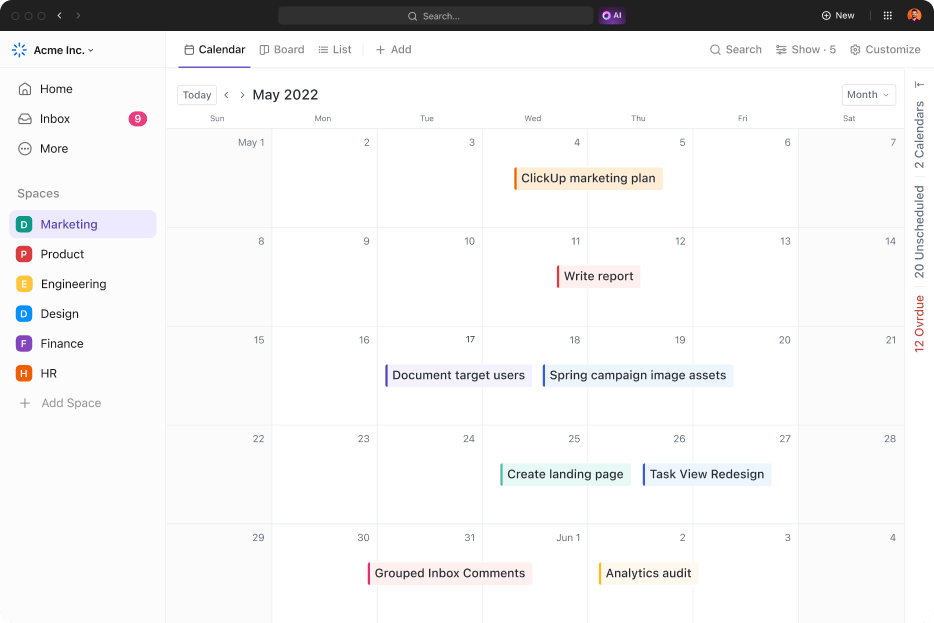
ClickUp Calendar View
Display all your team’s meetings, tasks, and deadlines in one place with the ClickUp Calendar View. Stay away from switching between platforms or losing track of important dates. You can easily filter by team, project, or individual to focus on what’s relevant.
ClickUp Meetings
ClickUp Meetings goes beyond basic video conferencing by integrating seamlessly with the ClickUp project management platform.
Its features include
- Centralized scheduling: To invite meeting attendees and manage RSVPs within ClickUp
- Automated reminders: For timely notifications and keeping everyone on schedule
- Meeting Notes and Action Items: To capture key points and assign follow-up tasks directly during the call
ClickUp Whiteboards
ClickUp offers a built-in whiteboard feature that transforms your Zoom call into a collaborative workspace. Brainstorm ideas, sketch diagrams, or create timelines in real-time, enhancing visual communication and engagement.

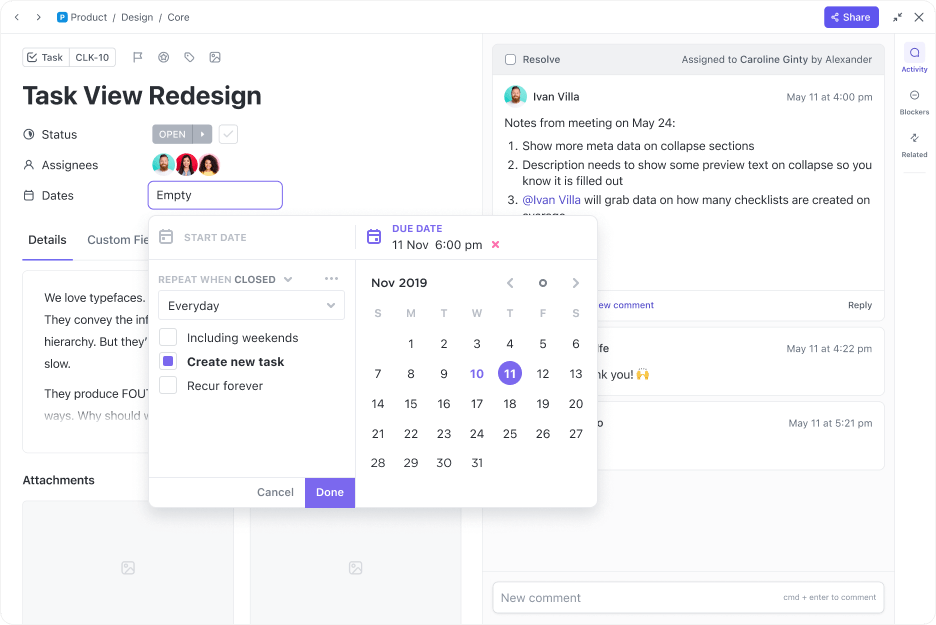
ClickUp Tasks
Use this feature to convert action items into actionable tasks within the platform. This streamlines communication promotes accountability, and keeps everyone on the same page even after the meeting ends.
End on a high note
Ending well isn’t just about ticking boxes. Inject personality or humor (depending on the meeting’s tone) to leave a lasting impression.
A quick “I look forward to seeing what we accomplish next” or a shared joke can spark anticipation for future Zoom meetings.
- The host leaves last: Allow attendees to leave at their own pace and get any final words in before disconnecting. The best practice here is for the host to hang up after everyone else has left the meeting
- Summarize key points and action items: Briefly recap the discussion, highlight key takeaways, and assign clear action items with deadlines to ensure everyone leaves with a sense of purpose and accountability
- Leave space for questions: Before officially ending the meeting, allow a few minutes for any final questions or clarifications. This ensures everyone’s concerns are addressed and people leave the meeting on a positive note
- Highlight accomplishments: If the meeting resulted in progress or breakthroughs, take a moment to acknowledge the collective effort and celebrate the success. This reinforces positive teamwork and motivates further collaboration
- Express gratitude: Thank your colleagues for their participation and time. It fosters a sense of appreciation and encourages active engagement in future meetings
Bonus: Fun Zoom icebreakers!
Bonus tips:
- If applicable, use the momentum of the current meeting to schedule the next one tentatively. This saves time in the future and demonstrates proactiveness in project management
- Use ClickUp Notes to capture key points and action items in real-time, allowing everyone to reference them quickly after the meeting
- Assign tasks directly within ClickUp, setting deadlines and assigning specific owners for follow-ups
- Reflect on your performance and identify areas for improvement. Did you speak too quickly? Was your background distracting? Use these insights to refine your virtual presence for future meetings

Beyond the call
Zoom meeting etiquette applies even after the meeting. It is vital to send meeting summaries and action items promptly after the call. Also, you should encourage participants to share their thoughts and suggestions for future meetings. ✏️
Bonus tip: Document the best practices and rules for Zoom meetings. Share these as guidelines in your organization so everyone is on the same page for future video conferences.
 Summarize this article for me please
Leading by Example: Zoom meeting etiquette
As workplaces evolve, Zoom has become our living room, conference room, and even happy hour venue. And effective Zoom etiquette is a two-way street.
By holding yourself accountable and treating others with respect, you can contribute to a more productive, engaging, and ultimately, more successful virtual environment for everyone.
By embracing these Zoom tips and leveraging the power of ClickUp, you’ll be well on your way to navigating the world of Zoom meetings with confidence and professionalism. 🎉
Give your Zoom meetings the ClickUp edge today!

Everything you need to stay organized and get work done.
