








Still downloading templates?
There’s an easier way. Try a free AI Agent in ClickUp that actually does the work for you—set up in minutes, save hours every week.
Sorry, there were no results found for “”
Sorry, there were no results found for “”
Sorry, there were no results found for “”
If I had an hour to solve a problem, I’d spend 55 minutes thinking about the problem and 5 minutes thinking about solutions.
Most of us treat brainstorming like a sprint: grab a whiteboard, shout new ideas, pick the loudest one. Einstein did the opposite. He lingered, circled, and obsessed over the question until it cracked open.
Good brainstorming techniques do exactly that. They help you ask better questions, explore problems from different angles, and create space for innovative ideas that wouldn’t surface in a typical meeting.
Your team has the creative potential. What you might be missing are methods that work for how your group thinks. Some people need silence to process. Others need rapid-fire energy. Some ideas need structure to take shape, while others need complete freedom to breathe.
The 18 techniques we’re covering give you options for every scenario and team dynamic. Plus, we’ll look at how ClickUp helps streamline your brainstorming process. 🎨
Brainstorming is a structured way for teams to generate ideas together without shooting them down immediately. It creates space where everyone can contribute freely, building on each other’s thoughts to find solutions that wouldn’t emerge from working alone.
The best brainstorming techniques balance creativity with focus, helping teams explore possibilities while staying on track.
🧠 Fun Fact: Brainstorming as we know it was invented by advertising executive Alex F. Osborn around 1939, and his rule ‘using the brain to storm a problem’ literally comes from how he wanted teams to attack creative challenges together.
When teams brainstorm together, something clicks that just doesn’t happen in solo work. For example:
📮 ClickUp Insight: 44% of our survey respondents stick to 1-5 tabs when browsing, but 8% live in “chaos mode” with 31+ tabs.
While not always intentional, it happens to the best of us: a Miro board for brainstorming, a Google Doc for SOP, a project management tab, and then ChatGPT for extra support. 👀
But every switch between apps or windows adds toggle tax, aka a hidden mental toll that chips away at your mental bandwidth and leaves you feeling scattered.
With ClickUp, you can centralize all your tools: think whiteboards, docs, tasks, web search, AI models like ChatGPT, Gemini, and Claude, and more under one Converged AI Workspace. Time to ban context switching and close those extra tabs down for good!
Here are some of the best creative brainstorming techniques that give you structure, spark momentum, and help you move from ‘stuck’ to solid ideas.
Mind mapping is a visual ideation technique that mirrors how your brain naturally makes connections. Each main branch in a mind map splits into smaller sub-branches as you dig deeper into related concepts. You keep branching until you’ve exhausted all angles.
💭 When to use: You’re dealing with a complex problem that has multiple interconnected parts, or you need to see how different project elements relate to each other.
📌 Example: A consultant mind mapping client retention discovers that quarterly check-ins connect to both upsell opportunities and referral requests, revealing a growth strategy she’d been overlooking.
Find the best AI tools for mind mapping here:
Brainwriting removes the performance pressure from group brainstorming sessions.
Everyone writes ideas silently for a set period, then passes their paper to the next person, who reads and builds on what’s there. This rotation continues until the sheets return to their owners. This brainstorming method eliminates the problem of loud voices dominating conversations and gives everyone equal space to contribute.
💭 When to use: Your meetings feature the same few voices, or you have team members who think better in writing than speaking.
📌 Example: During a product meeting, an intern’s technical note gets enhanced by a developer’s implementation details and a designer’s interface sketch, creating a feature concept none would have reached individually.
🔍 Did You Know? Modern large-scale brainstorming is going AI: a method called Conversational Swarm Intelligence (CSI) uses AI ‘surrogate agents’ to help hundreds of people brainstorm at once, making group sessions more collaborative and yielding higher-quality ideas.
Round-robin brainstorming guarantees every voice gets heard through pure structure. The facilitator establishes a clear order around the room. Each person shares one idea when their turn arrives.
This eliminates the chaos of people talking over each other and keeps everyone engaged because they know their turn is coming.
💭 When to use: You need input from everyone present, or you’re tackling decisions where missing someone’s perspective could prove costly.
📌 Example: At a small firm’s client pitch meeting, the usually quiet junior team member mentions that the prospect’s CEO speaks at sustainability conferences, reshaping their entire approach.
📖 Also Read: Round Robin Meeting: How to Set Up + Best Practices
SCAMPER is a structured framework that gives you seven specific ways to transform existing ideas. Each letter represents a different manipulation you can apply to what you’re working with.
The technique turns vague ‘think creatively’ instructions into concrete prompts that actually generate new directions. When you systematically apply each lens, you find angles you’d never consider through unstructured thinking.
💭 When to use: You’re improving something that already exists, or your team keeps proposing variations of the same safe idea.
📌 Example: A subscription box company applies ‘Eliminate’ to their packaging, removing physical inserts entirely and replacing them with QR codes, cutting costs while improving the customer experience.
🧠 Fun Fact: Brainstorming while walking helps teams engage more equally. In a study comparing walking sessions to sitting sessions in brainstorming, researchers found that walking groups sustained mental energy longer and people contributed more evenly.
Most problems teams try to solve are really just symptoms of deeper systemic issues. Five Whys drills through symptoms to expose root causes.
You state your problem, then ask why it exists. Take that answer and ask why again. Repeat until you hit something fundamental, usually around five iterations. This stops you from wasting resources on surface fixes while the real issue persists underneath.
💭 When to use: The same problem keeps recurring despite your solutions, or quick fixes never seem to stick.
📌 Example: A shop asks why cart abandonment is high. Because checkout is slow. Why? Too many form fields. Why? Collecting unused data. Why? Marketing requested it years ago. Why is it still there? Nobody questioned it. The real fix is deleting fields, not redesigning checkout.
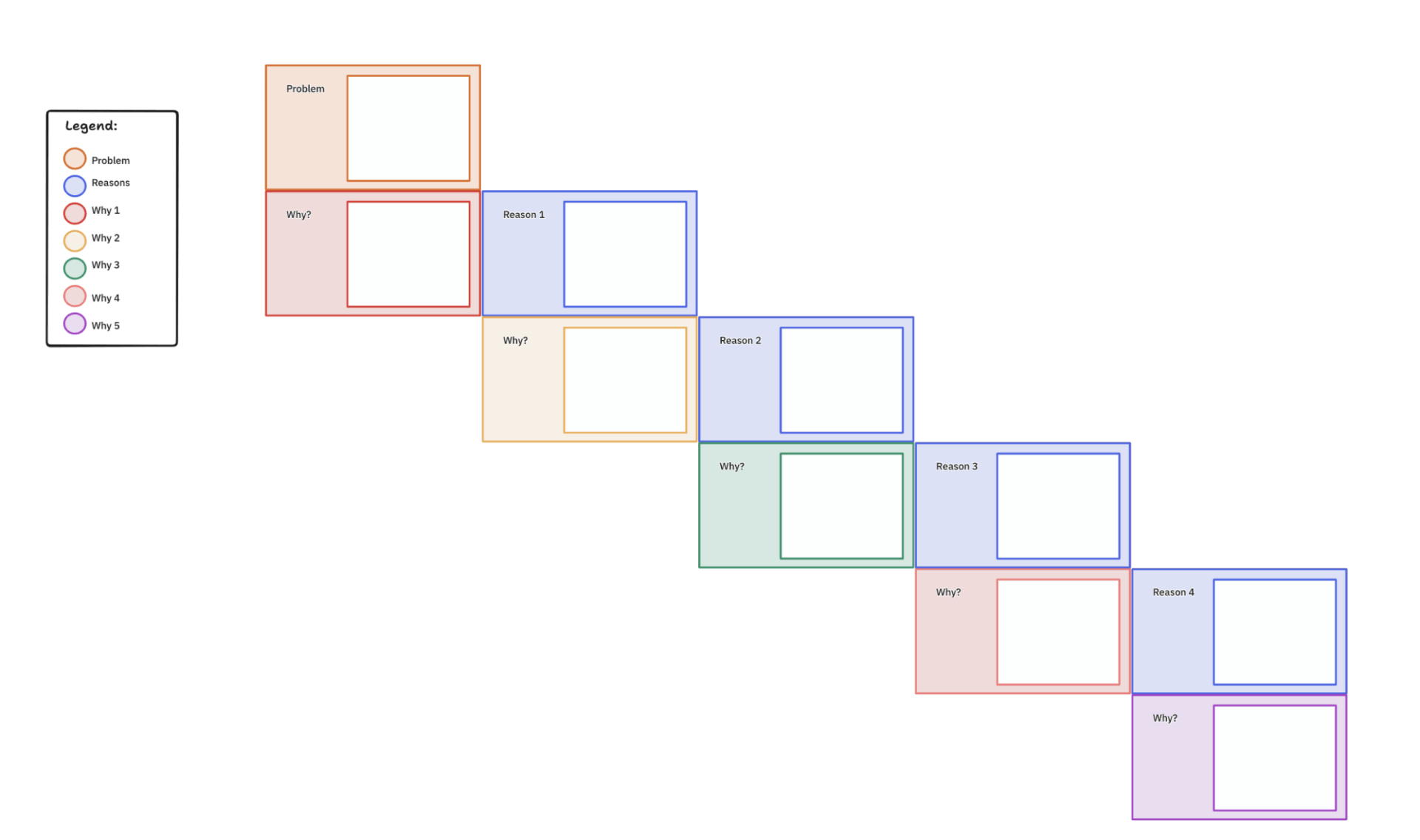
⚡️ Template Archive: The ClickUp 5 Whys Template helps your team dig into a problem deeply. It gives you a ready-made whiteboard where you ask ‘Why?’ repeatedly.
As you work through each ‘Why?’, you document answers and brainstorm corrective actions. Once you identify meaningful root causes inside the 5 Whys template, you can immediately convert them into action items inside ClickUp so that your insights lead to real, lasting change.
Starbursting generates questions before answers.
The technique exposes gaps and weak spots in your thinking before you commit resources because the questions you struggle to answer reveal where your planning is thin.
💭 When to use: An exciting idea hasn’t faced proper scrutiny, or you need to pressure-test a plan before committing resources.
📌 Example: A studio considers adding a smoothie bar, but starbursting reveals unanswered questions about staffing during peak times, permit requirements, storage space, and pricing competitiveness that force them to rethink the entire concept.
💡 Pro Tip: Create a 10-second veto rule. If someone shoots down an idea too quickly, they must propose an alternative immediately. It breaks the silent habit of shutting down routes that could have evolved into something workable.
Rapid ideation uses extreme time pressure to bypass your internal critic. You set a tight timer and generate as many ideas as possible without stopping to evaluate anything.
The only goal is volume. Time pressure short-circuits the judgment function in your brain, allowing unexpected and unconventional concepts to emerge before you can veto them.
💭 When to use: Your team is playing too safe, or the brainstorming meeting’s energy has gone flat and careful.
📌 Example: A pet supply company runs a 10-minute rapid session for product names, generating dozens, including ‘Bark Twain’ and ‘Fuzz Aldrin,’ three of which actually make it to production.
🔍 Did You Know? Some brainstorming research suggests the classic ‘no criticism allowed’ rule may backfire: too much politeness or ‘protecting feelings’ can actually limit creativity, because debate often sparks more ideas than safe praise.
Reverse brainstorming flips your problem upside down. Instead of solving it, you brainstorm how to cause it or make it worse.
People get surprisingly creative when asked to break things, and the reversed ideas often expose mistakes you’re currently making without realizing it.
💭 When to use: Normal brainstorming techniques produce bland results, or you need to identify weaknesses in your current approach.
📌 Example: A software company asks how to make customers cancel immediately. Ideas include a confusing interface and slow support. Reversing these reveals they’re already guilty of both, finally explaining their retention problem.
🚀 ClickUp Advantage: Brainstorm smarter with ClickUp Brain MAX, an AI desktop companion that understands your projects, ideas, and past work. It supports every part of your brainstorm because it keeps your thinking, context, and follow-up tightly connected.
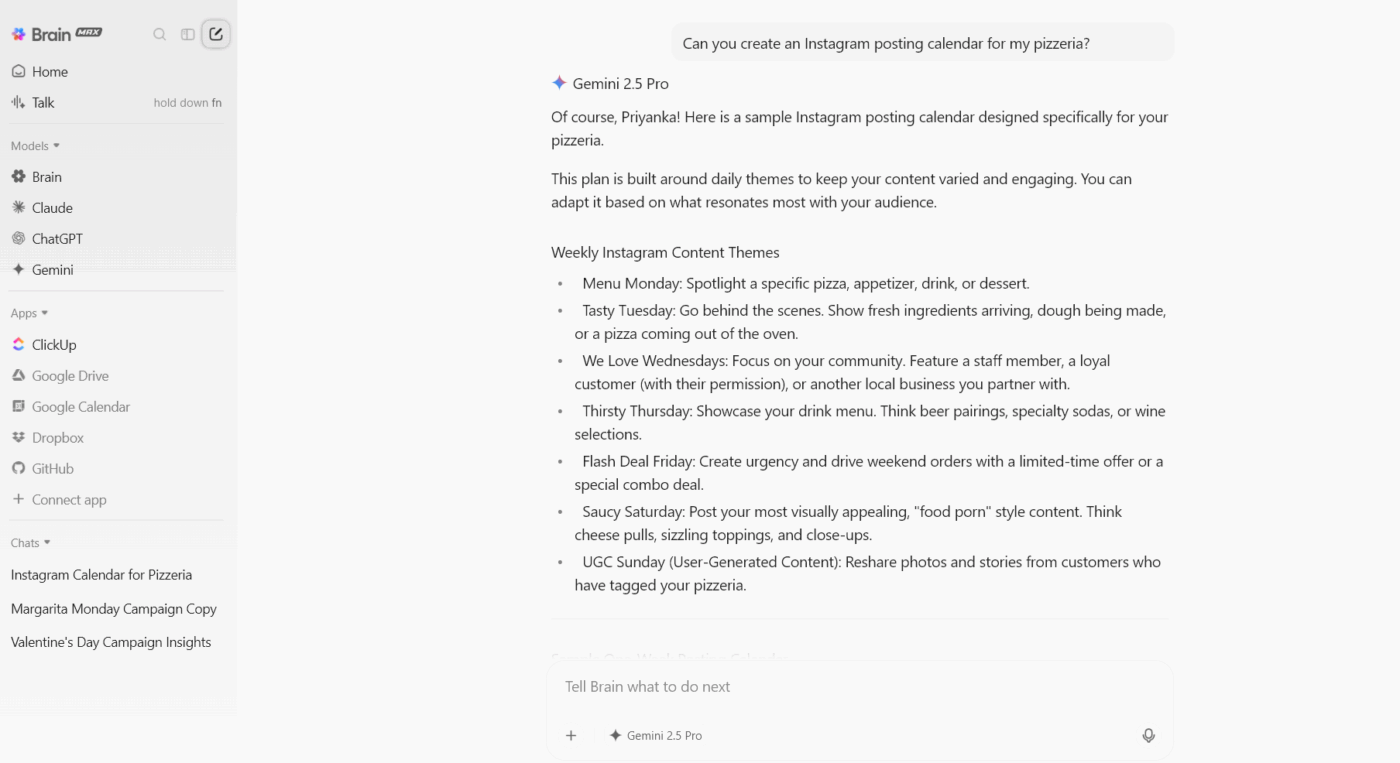
Here’s how to use AI for brainstorming:
Here’s a closer look at how ClickUp Brain MAX eliminates AI sprawl:
The Six Thinking Hats technique separates different thinking modes into distinct phases. Everyone wears the same coloured hat simultaneously, each representing a specific perspective.
This prevents arguments where people talk past each other from different mental frameworks.
💭 When to use: Discussions turn into arguments, or certain voices consistently overpower others.
📌 Example: A restaurant debates delivery service. Black hat surfaces quality concerns during transport. Yellow hat reveals new revenue streams. Red hat gives the chef space to express his resistance. Each perspective gets heard.
SWOT analysis forces you to evaluate ideas through four balanced quadrants.
The grid prevents lopsided thinking where optimists ignore problems or pessimists miss possibilities. Filling all four boxes honestly gives you a complete picture before making decisions.
💭 When to use: You’re making a significant decision, or your team tends toward unfounded optimism or excessive pessimism.
📌 Example: A designer considering online teaching maps strong portfolio skills against weak video abilities and huge market opportunity against established competitors, revealing she needs a production partner.
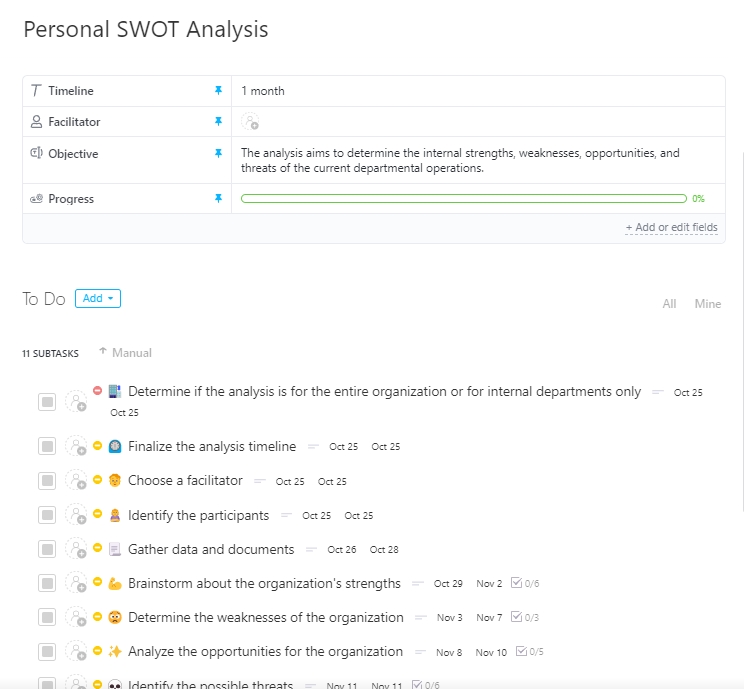
⚡️ Template Archive: ClickUp’s Personal SWOT Analysis Template helps you reflect deeply on your own strengths, weaknesses, opportunities, and threats.
The SWOT analysis template gives you a built-in framework to map out what you’re really good at, where you struggle, which external chances you can grab, and the risks you need to watch. It’s the perfect starting point for a more strategic brainstorming session.
Storyboarding visualizes ideas as sequential frames like a comic strip. You sketch what happens step by step from beginning to end, using simple drawings to show the progression.
Seeing the timeline exposes friction points and emotional beats that text descriptions miss.
💭 When to use: You’re designing an experience or process, or your team can’t align because everyone imagines different versions.
📌 Example: An education platform storyboards a new student’s first week and discovers their interface creates confusion at enrollment, frustration at finding materials, and eventual abandonment.
⚡️ Template Archive: ClickUp’s Storyboard Template helps you lay out your ideas in a visual sequence, making it ideal for brainstorming plans that need structure, flow, and story.
With this storyboard template, you can sketch frames, whether you’re planning a video, a campaign, or a user journey, and assign each frame a piece of the narrative. That clarity gives your team a shared vision, helping you pivot or refine concepts before locking anything down.
Crazy eights demands eight sketches in eight minutes, one per minute.
The time constraint eliminates perfectionism and overthinking. Your first ideas are usually obvious. The last few, drawn in rushed panic, often contain something genuinely interesting because you’re too frantic to self-censor.
💭 When to use: Your team overthinks everything, or you’re paralyzed trying to find the perfect solution before attempting anything.
📌 Example: A furniture designer rushing through lamp concepts scribbles a laptop-clamp design in the final thirty seconds that becomes their bestselling product for remote workers.
💡 Pro Tip: Host a bias flush. Ask everyone to write down their first expected answer or instinct. Then make a rule: those first instincts are banned from the brainstorm. You’ll avoid the default path and get fresh angles.
Gap analysis identifies the specific distance between where you are and where you want to be. Each gap you identify becomes a focused brainstorming session target. This transforms vague ambitions into specific, solvable problems.
💭 When to use: You have clear goals but no pathway to reach them, or you’re overwhelmed by possible improvements and need to prioritize.
📌 Example: A podcast creator wanting to grow from 1,000 to 10,000 listeners performs a gap analysis to spot what he’s missing in publishing consistency, audio quality, social promotion, and collaboration, turning ‘grow the show’ into five concrete problems to solve.
⚡️ Template Archive: The ClickUp Gap Analysis Template gives your team a clean way to compare where things stand with where you want to go, which makes it ideal for structured brainstorming techniques.
The gap analysis template keeps the discussion grounded, helps everyone think in the same direction, and supports smoother decision-making during your ideation session.
Brain-netting moves content brainstorming online and asynchronously. Team members contribute to a shared digital space over hours or days rather than in real-time meetings.
This respects the fact that great thinking doesn’t happen on meeting schedules and gives everyone equal access, regardless of time zones or thinking styles.
💭 When to use: Your team spans time zones, or you have people who contribute better outside live meetings.
📌 Example: A global agency runs a three-day brain-net where the strategist posts morning ideas, the copywriter adds headlines at midnight, and the designer contributes visuals in the afternoon, creating richer concepts than any single meeting could produce.
🧠 Fun Fact: Turns out moderate background noise is a creativity hack: around 70 dB (the din of a busy cafe) helps trigger abstract thinking and makes people way more original. Too loud or too quiet, though, and creativity drops.
Role storming has you generate ideas from someone else’s perspective. Everyone embodies a specific person or character during the session and contributes from that viewpoint, not their own.
The role creates psychological distance from usual constraints and politics. People say things they’d normally self-censor because the character gives permission to think differently and speak uncomfortable truths.
💭 When to use: Your team is too close to the problem to see clearly, or internal politics prevent honest feedback in the idea generation process.
📌 Example: A software team brainstorms as frustrated users and voices complaints about buried settings, cryptic errors, and jargon-filled documentation that they’d never say as themselves, revealing real usability problems.
Lightning decision jam (LDJ) compresses problem-solving into a fast, structured sprint that forces decisions.
The entire process typically takes under an hour. But what makes it powerful is the combination of time constraints and democratic voting that prevents any single voice from hijacking the outcome. Teams move from problem to concrete action plan without getting stuck in debate loops.
💭 When to use: Your team talks endlessly without reaching decisions, or you need to solve something quickly without sacrificing input quality.
📌 Example: A startup burns 30 minutes debating their homepage design every week. They run a lightning decision jam that surfaces ‘visitors don’t understand what we do’ as the core problem, generates eight solution concepts, and exits with assigned tasks to test a clearer value proposition.
🚀 ClickUp Advantage: Keep communication seamless using ClickUp Chat. While you brainstorm, you can open Chat to exchange messages in real time. Since everything lives in ClickUp, you don’t need to hop into Zoom or Slack because context stays together.

Better yet, start a ClickUp SyncUp (audio or video call) directly inside Chat. SyncUps let you jump into face-to-face meetings and share your screen. Plus, after the call, AI generates summaries, transcripts, and action items for you.
The eidetic image method taps into visual memory to unlock detailed observations. Eidetic imagery refers to the ability to retain vivid mental pictures. You observe something closely for a set period, then close your eyes and describe everything you saw in as much detail as possible.
The act of forcing recall surfaces details your conscious mind didn’t register initially.
💭 When to use: You’re analyzing something complex that deserves close attention, or your team keeps missing important details in familiar situations.
📌 Example: A UX designer studies a competitor’s checkout flow for three minutes, then describes it from memory. She realizes she can’t recall where the security badges were placed, revealing that trust signals are poorly positioned in her own design.
🧠 Fun Fact: Doodlers stay more focused, which helps them maintain attention and sometimes recall more.
Step-ladder brainstorming prevents early ideas from dominating the conversation. Team members enter the discussion one at a time, sharing their thoughts before hearing what others said.
The technique ensures that each person forms independent opinions rather than just reacting to whoever spoke first.
💭 When to use: Strong personalities tend to set the direction early, or you want to ensure independent thinking from each team member.
📌 Example: A marketing team uses a step ladder for campaign concepts. The account manager enters last and pitches a guerrilla marketing angle that contradicts the polished digital approach the group had rallied around, forcing them to consider both directions seriously.
Learn more about brainstorming techniques here:
A strong brainstorming session gives your team direction, energy, and clarity. You guide the group through structured steps, encourage honest experimentation, and shape the raw ideas into something useful.
ClickUp is the everything app for work that combines project management, knowledge management, and chat—all powered by AI that helps you work faster and smarter. It helps you do all of this in one place, so no one loses track of context and every idea moves toward action.
Follow these steps to run a successful session with the brainstorming software. 👇
Start the whole thing by getting painfully clear on what you want to walk away with. Most teams rush into throwing ideas around, then realize halfway in that everyone solved a different problem.
So write down the challenge in one crisp sentence, note the outcome you’re aiming for, and share a little context so nobody fills in the blanks themselves.
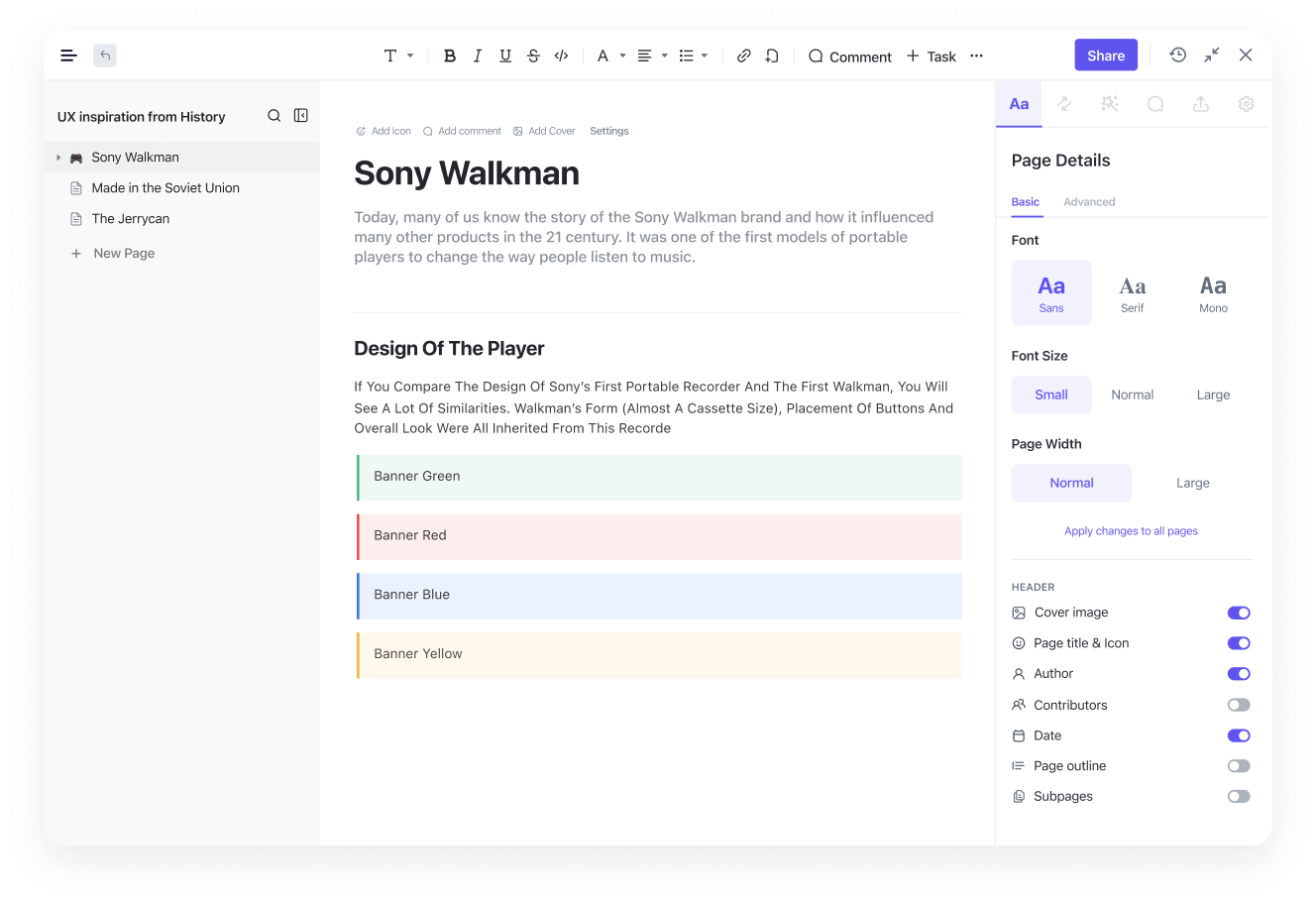
You can make this easier inside ClickUp Docs. It gives you enough breathing room to lay out the problem in a way your team can skim and instantly get.
Suppose you’re prepping a brainstorm for a new feature launch. You can open a doc, add a short section like ‘What Are We Solving,’ follow it with customer insights, and end with a tiny checklist of success markers. When your team sees that doc before the session, the conversation starts sharper because the baseline is already set.
Once the goal is clear, pick a method that suits the type of thinking you need.
If you want to break a problem open, try Five Whys. If the group feels stuck, reverse brainstorming can loosen things up. The trick is to avoid using the same method for every challenge.
This step becomes smoother when you visualize your approach. ClickUp Mind Maps help you do that without making it feel like extra work. Let’s say your team needs to figure out why people drop off during onboarding.
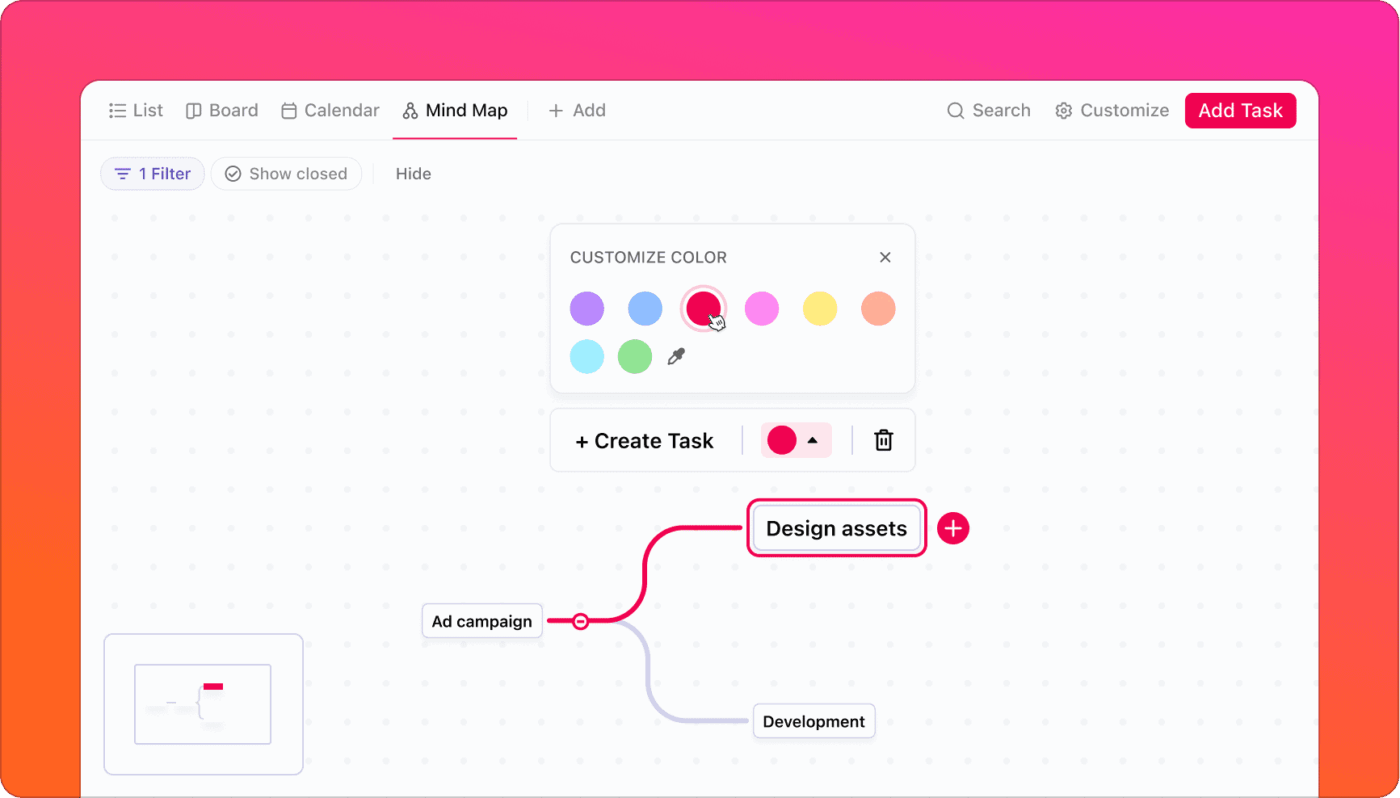
You can map out the main challenge in the center, branch out each possible cause, and expand the trail as the team adds insights. The structure grows naturally and keeps everyone anchored.
To keep people aligned, add a few simple boundaries:
These simple rules help your team stay focused without feeling boxed in.
A brainstorming session feels chaotic when nobody knows who is doing what. Decide on a facilitator, a note keeper, and contributors. Then give each activity a time limit so the energy stays steady.

ClickUp Tasks help you set the rhythm before the session starts. You can create a task called Brainstorm Flow, assign someone as the facilitator, attach your prep doc, and add subtasks for each stage.
If you’re running a 30-minute session, you can add subtasks like Warm-up, Idea Round, Clustering, and Shortlist. Everyone walks into the room already knowing how the session will unfold.
Ansh Prabhakar, Business Process Improvement Analyst at Airbnb, shares his experience with using ClickUp:
ClickUp has a lot to offer in one place such as project management, brainstorming options, task management, project planning, documentation management, etc. It has definitely made life comparatively easier as it’s easy to use, UI is well designed, and collaboration within the team and with other teams is easier. We were able to manage work better, track and report work easily, and based on progress daily huddles, future planning was easy.
When you hit the brainstorming part of your session, you need one space where everyone can freely dump unusual ideas and start turning the good ones into real work.
Start by getting everything out in the open. Ask everyone to add thoughts in quick bursts.
For example, during a brainstorm for new onboarding improvements, teammates might toss in ideas like weekly welcome tips, micro-video tours, or clearer walkthrough prompts. You want fast thinking here, not perfect phrasing.
Now you switch from collecting to organizing ideas. It helps to do a quick sweep that focuses on two things:
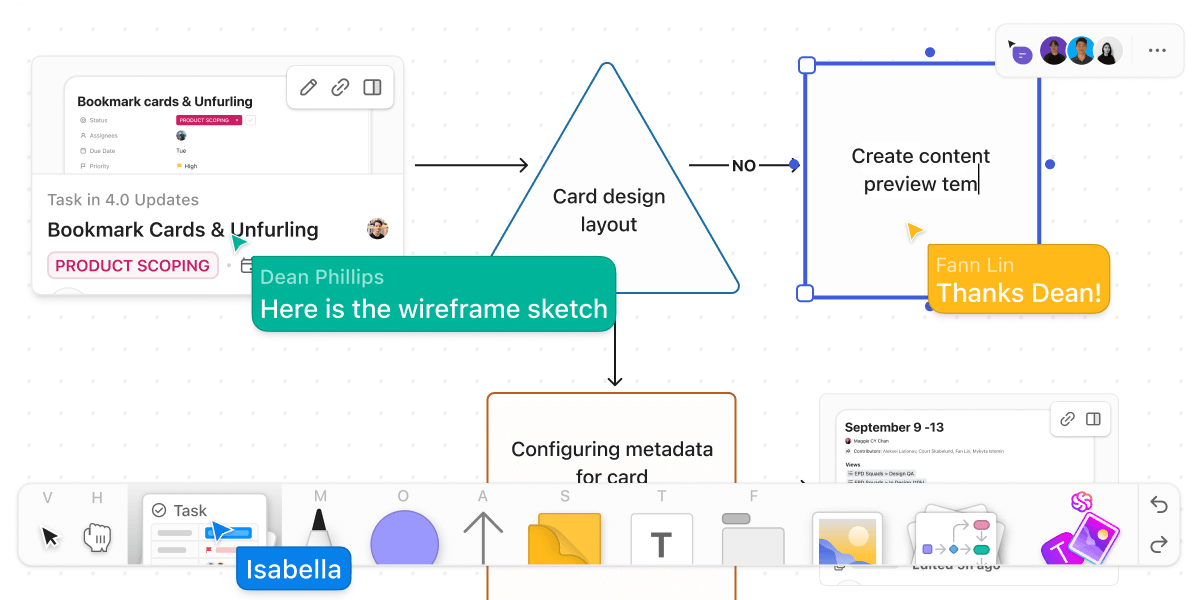
ClickUp Whiteboards support this stage really well because the space stays flexible while still giving you tools to keep things neat.
You can drop sticky notes around the board, drag them into clusters, add connectors to show relationships, and create frames that hold mini themes.
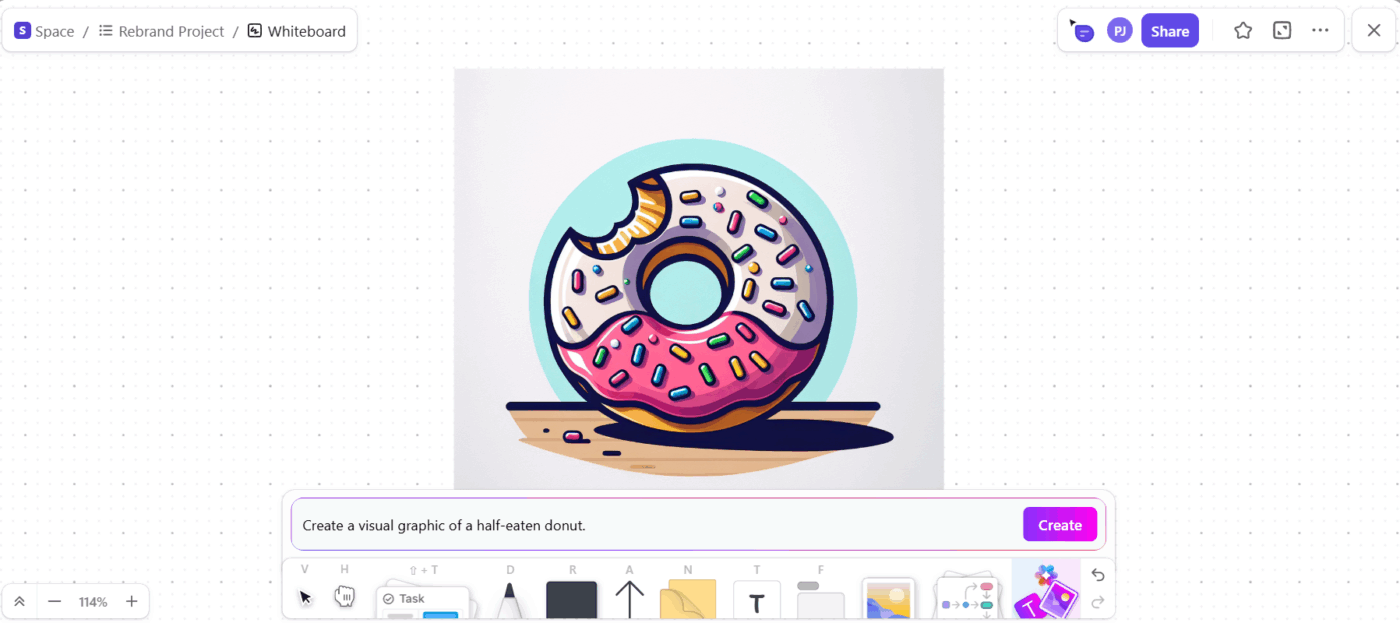
ClickUp Brain, the integrated AI assistant, adds another layer here. You can generate quick visuals directly inside the whiteboard, which helps when your ideas need a reference point.
📌 Try this prompt: Create a visual graphic of a half-eaten donut.
When something starts looking like an actual project direction, convert it into a task. Whiteboards let you turn sticky notes or shapes into a task in one click.
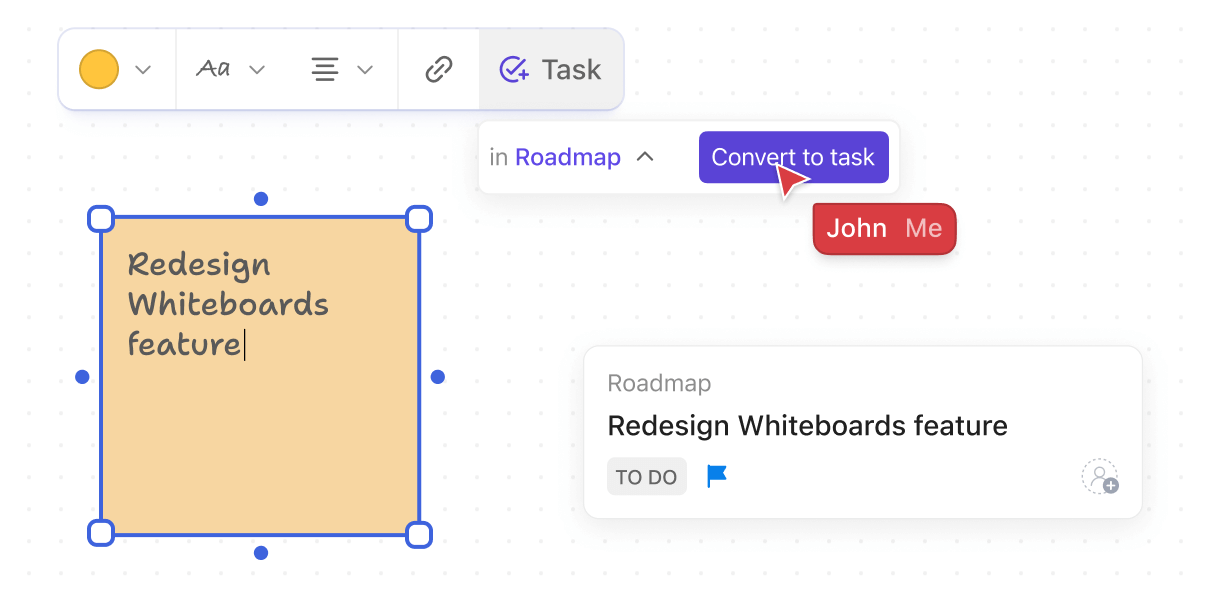
What’s more, if you have supporting information, pull in a ClickUp Doc directly into the idea board. It keeps research, references, or screenshots right next to the ideas you are shaping. Everyone stays aligned because no one goes hunting for missing context.
Now get the team to vote on the ideas that stand out. Turn the chosen idea into the first outline of an action plan so the excitement doesn’t fade as soon as the meeting ends.
ClickUp Brain helps you turn that raw idea into something workable.
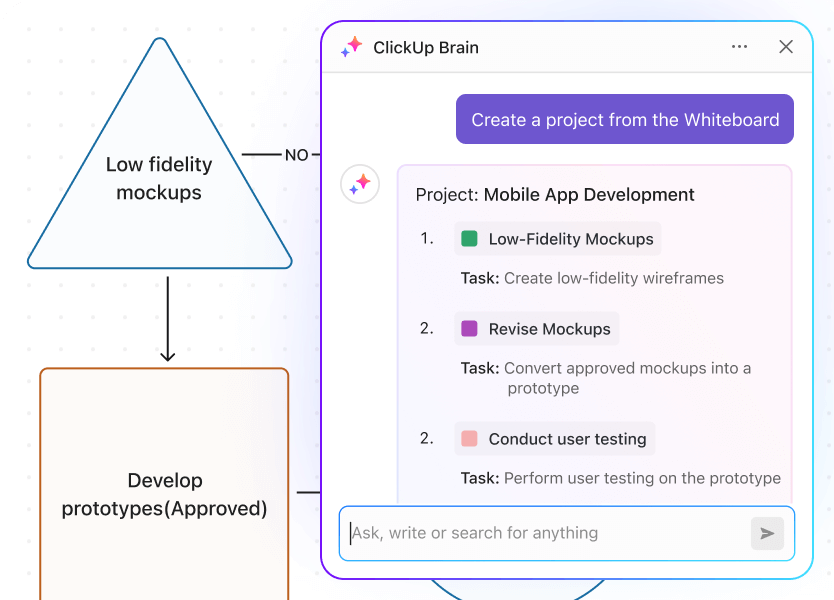
Let’s say the team votes for a weekly insights newsletter. You can drop that idea into ClickUp Brain and get instant structure that includes content themes, contributors, and a drafting rhythm.
Once that’s good to go, you can ask AI to create a task with relevant subtasks for Research, Drafting, Visuals, and Publishing, then assign owners.
💡 Pro Tip: Use a live AI divergence-convergence pattern.
This creates structured creativity rather than random chaos.
Most brainstorming techniques aren’t productive because they lack structure. Here are some tips to move the needle:
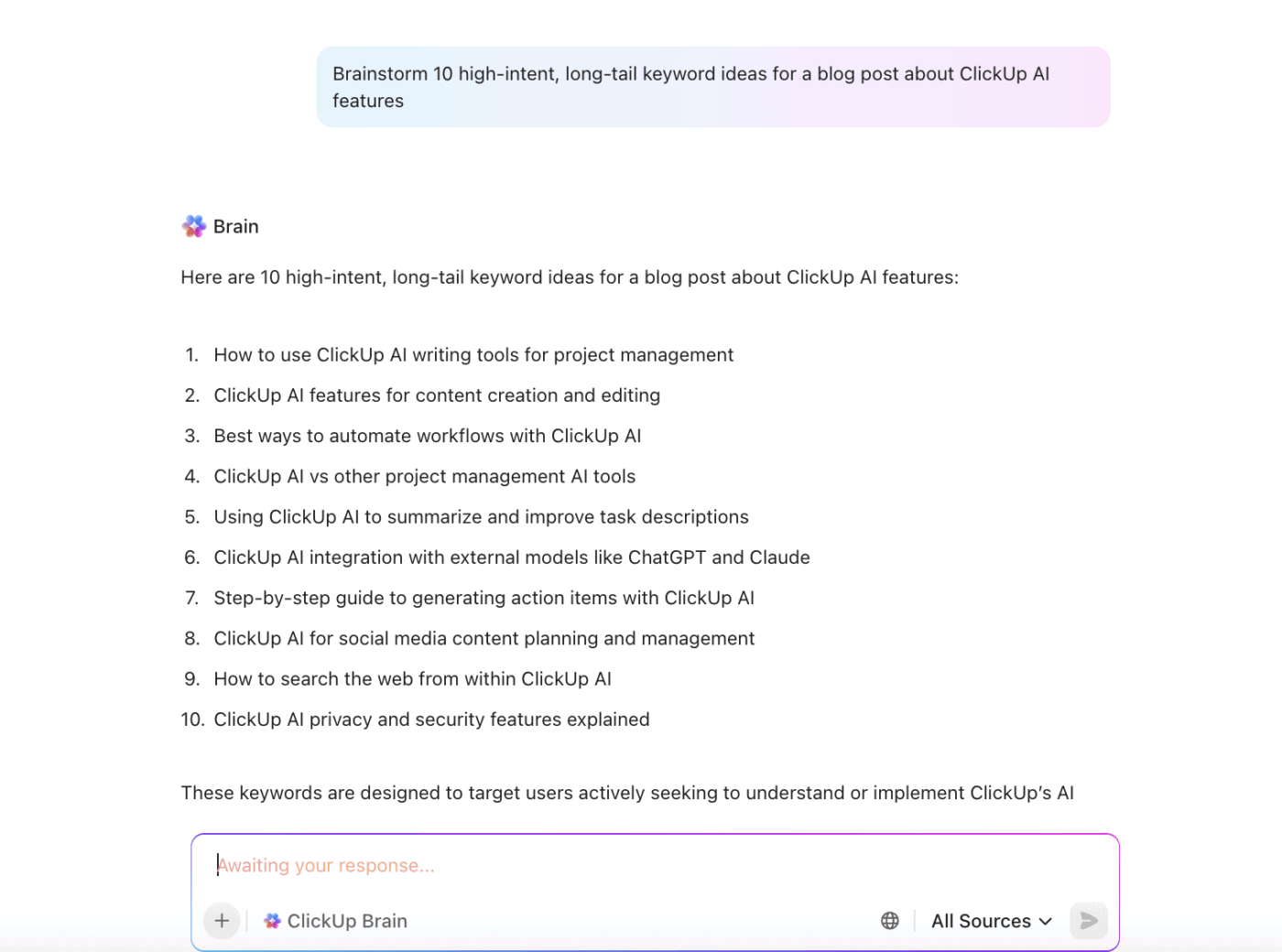
Need a quick brainstorming partner for your work? Just use the Ask AI option in your ClickUp workspace. ClickUp Brain won’t disappoint.
🔍 Did You Know? Working in a messy room might actually help you brainstorm better: people in disorderly environments generated more interesting ideas and showed a stronger preference for novelty vs. convention.
Great ideas don’t show up on command, and no two teams think the same way. Some people sketch, some talk things through, and some need quiet space before sharing.
Strong brainstorming techniques meet those differences with structure, intention, and a little playfulness. When you give your team the right mix of methods, you turn scattered thoughts into momentum that leads somewhere.
That momentum stays strong when your entire process lives in a single place.
ClickUp gives you the space to think freely and the structure to act quickly. Whiteboards help you capture every spark, ClickUp Brain MAX boosts your ideas with AI that knows your context, and Docs, Tasks, and Mind Maps keep everything connected so your brainstorm doesn’t lose steam once the call ends.
Sign up for ClickUp today! ✅
Rapid ideation focuses on speed. Participants produce ideas independently within a short time window, which encourages volume and removes pressure. On the other hand, round-robin brainstorming moves in order, giving each person a turn. It’s structured, slower, and useful when a team wants equal participation.
Reverse brainstorming works best when a team needs fresh angles by flipping the problem and thinking through what could cause failure. Five Whys suits root-cause analysis when a team already has a clear issue and needs to trace it back to its origin.
A practical target is 20-40 ideas. This range keeps the session energetic while leaving enough time to sort, cluster, and refine concepts afterward.
Teams benefit from tools that support synchronous input and visual clarity. ClickUp Whiteboards feature sticky notes, task creation, comments, and grouped idea mapping during virtual sessions.
Online brainstorming works well with platforms like ClickUp Whiteboards. It supports shared canvases, templates, and idea tracking across your brainstorming sessions.
AI helps with idea generation by creating starter prompts, expanding half-formed ideas, and offering variations teams might overlook. It also clusters related suggestions and speeds early-stage exploration.
Shift environments, break the task into smaller steps, use prompts, revisit past ideas, or switch to low-pressure techniques like doodling or mind-wandering. Small resets often unlock momentum.

© 2026 ClickUp

There’s an easier way. Try a free AI Agent in ClickUp that actually does the work for you—set up in minutes, save hours every week.